
Toggles and dropdowns in notes
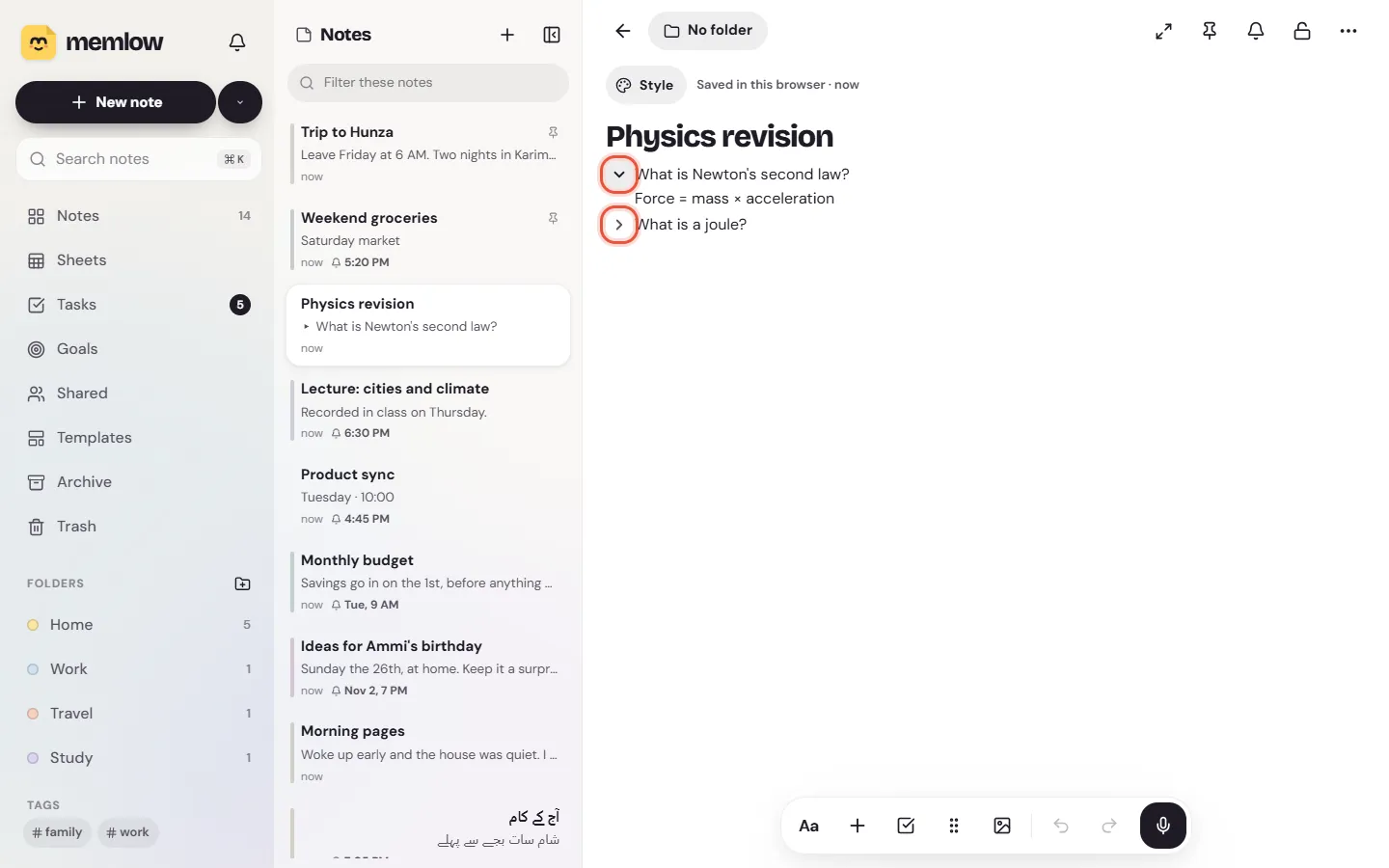
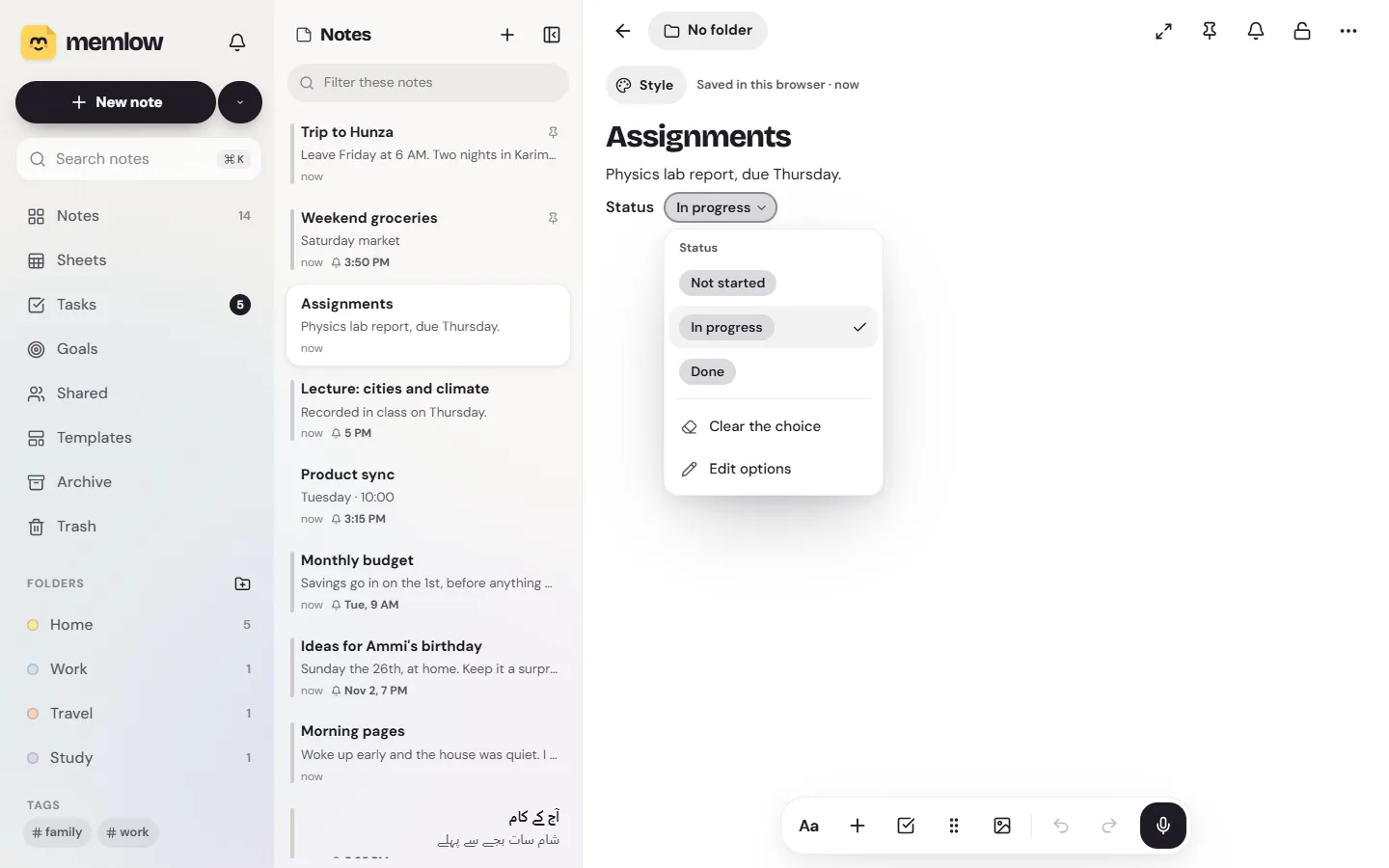
A toggle in notes is a line with a small arrow: tap the arrow and the lines tucked under it show or hide. A dropdown is a pill you tap to pick one option from a short list you make, such as Not started, In progress or Done. You'll find both in the + menu in either app.
Add a toggle
- Put the cursor on the line that should become the toggle's title. An empty line works too.
- Type
/toggleand pickToggle. Or tap+and chooseToggle, underLists. Or type>and two spaces at the start of the line. - Type the title, then press Enter to write the first line inside.
Each new line you start inside stays inside the toggle. Press Enter on an empty last line to step back out of it.
Open and close a toggle
Tap the arrow beside the title: Show what's inside or Hide what's inside. With a keyboard, press Ctrl + Enter in the title (⌘ + Enter on a Mac).
Whether a toggle is open is kept on each device, not in the note. Opening one doesn't change the note, and it doesn't open on your other devices or for the people you share it with. A toggle you make starts open on that device. If Find, or the cursor, needs to reach a line inside a closed toggle, the toggle opens by itself.
Move lines in or out, and delete a toggle
- To move a line into the toggle just above it, press Tab. Shift + Tab moves it back out. On Android, the ⋮⋮ button (
Block actions) also hasMove into toggleandMove out of toggle. Backspaceat the start of the title turns the toggle back into an ordinary line. What was inside stays, just under it.- To delete a toggle that has lines inside, use
Block actions, thenDelete block. On Android, Memlow asks whether to keep what's inside (Delete, keep what's inside) or delete it too (Delete with what's inside).
Toggles suit notes that grow long. Fold each day away in a week planner, or put a question in the title and its answer inside for revision. For a heading that folds the section under it, see Collapse section in Write and format notes.
Add a dropdown
- Put the cursor on an empty line.
- Type
/dropdownand pickDropdown. Or tap+and chooseDropdown, underElements. - Memlow adds a dropdown with three options,
Not started,In progressandDone, and opens its options so you can change them.
A dropdown sits on its own line. You can give it a label in front, with Add a label, such as "Status" or "Paid?".
Pick an option
Tap the pill. It says Choose until something is picked. The list shows every option, with the chosen one ticked:
- Tap an option to choose it.
Clear the choiceempties the pill again.Edit optionslets you change the list.
In a note someone shared with you, everyone picks from the same options, and everyone sees what was chosen.
Edit the options
Choose Edit options from the dropdown's list.
- Change an option's words by typing over them.
- Tap its colour to pick one of nine.
- Drag the grip beside it to put it in another place. With a keyboard, Alt + ↑ and Alt + ↓ move it.
- Tap × (
Remove) to take it out. Add an optionadds another at the end.
Close the list when you're done. On Android, tap Done.
In PDFs, exports and shared notes
- A PDF of the note prints every toggle open, so nothing inside is left out, and a dropdown as the pill you see. See Print a note or save it as a PDF.
- Exported as Markdown, a toggle becomes a
<details>block, and a dropdown its label and chosen option. When you bring that file into the web app, the toggles come back. See Export notes. - In a shared note, each person can open and close toggles for themselves, and everyone picks from the same dropdown options.
Questions and answers
How do I hide text under a toggle?
Type /toggle on a line, or tap + and choose Toggle. Write the title, press Enter and type what should go inside. Tap the arrow to hide or show it.
How do I add a dropdown to choose from?
Type /dropdown on an empty line, or tap + and choose Dropdown. It starts with Not started, In progress and Done, and Edit options changes them.
Does a toggle stay open on my other devices?
No. Open or closed is kept on each device. Opening a toggle doesn't change the note.