
Link notes and add web links
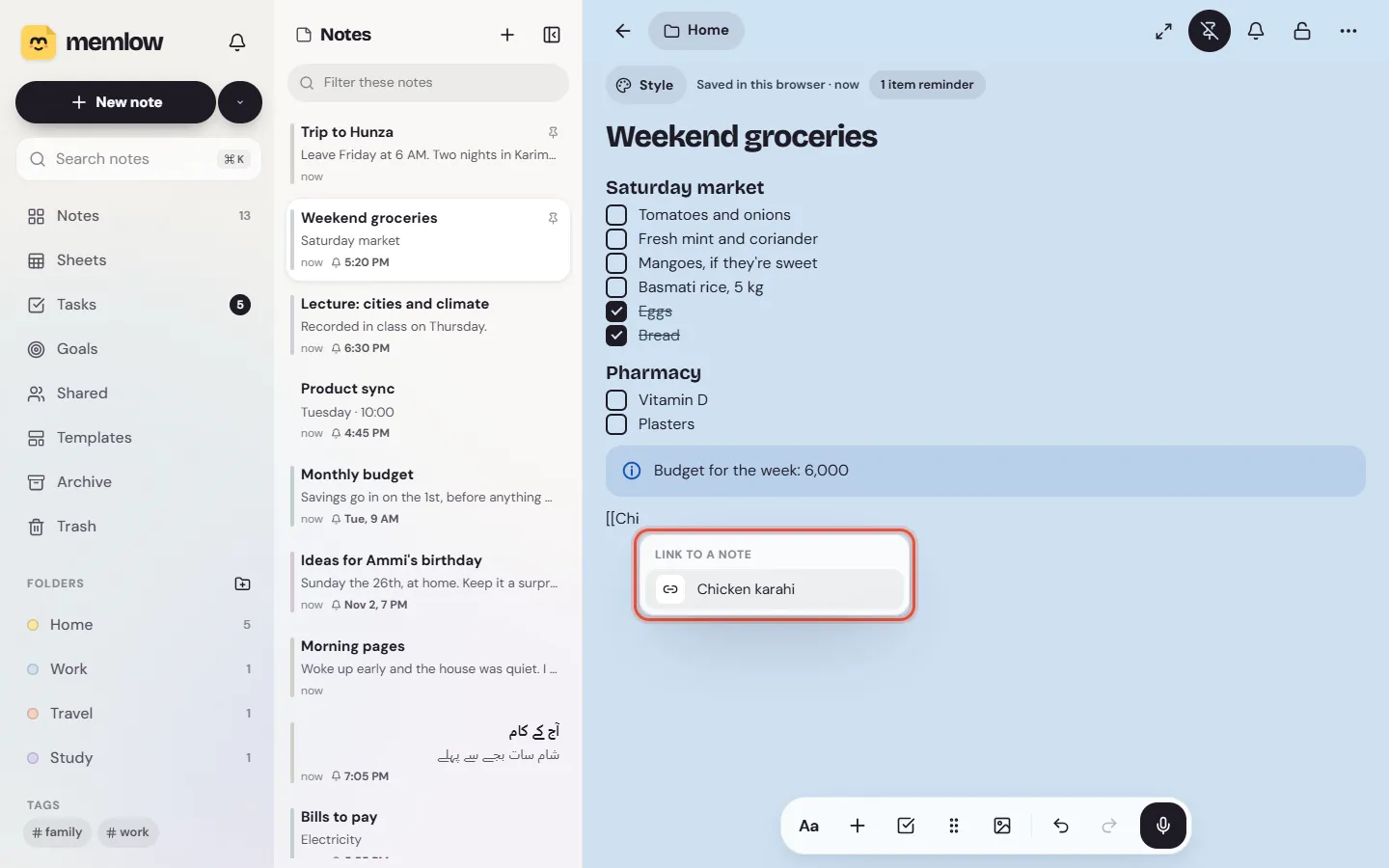
To link notes together in Memlow, type [[ in a note and pick the note to link to. The link shows the other note's title, and a tap opens it. Words can link to a web page too: select them and choose Link, or paste an address over them.
Link to another note
- In the note, type
[[. - Start typing the other note's title. Memlow lists the notes that match.
- Pick one. The link takes the note's title, in bold.
On Android
The toolbar's [[ ]] button (Link to a note) types the brackets for you. Memlow shows up to six matching notes. If none has the title you typed, Create makes a new, empty note with it, in the same folder, and links to it.
On the web
Memlow shows up to eight matching notes, most recently changed first. Move through them with ↑ and ↓, and press Enter or Tab to pick one. If none matches, it says No note with that title: make that note first, then link to it.
Tap or click a link to open the note it points to, even while you're writing. If you rename that note, every link to it shows the new title. On Android, a link to a note that's been deleted turns grey and struck through.
Links tie notes together. A meal plan can open the shopping list, and lecture notes can open the course's reading list.
See which notes link here
On Android
At the bottom of a note, Linked from lists every note that links to it. Tap one to open it. Note info in the note's ⋯ menu also counts the links in this note (Links to notes).
On the web
Open the note's menu (More) and choose Note info. Under Linked from are the notes that link to it. Choose one to open it.
Add a web link to words
- Select the words.
- Choose
Link. On Android it's inAa. On the web it's in the small bar above the words. With a keyboard, press Ctrl + K (⌘ + K on a Mac). - Paste or type the address in
Web address, and chooseApply.
Quicker still: copy an address, select the words and paste. The words become a link to it, and stay as they were.
A link can go to a web page, an email address or a phone number. Anything else gets That isn't a web or email address. Addresses you type out in full, such as www.example.com or an email address, show as links by themselves.
Open, edit or remove a web link
While you're writing, tapping a web link puts the cursor in it and shows a small card:
- Tap the address to open it (
Open link). Copy addresscopies it.Edit linkchanges where the words point.Remove linktakes the link off and keeps the words.
On the web, Ctrl + click (⌘ + click on a Mac) opens a link straight away. In a note you can only read, and in reading mode on Android, a tap opens the link.
Questions and answers
How do I link one note to another?
Type [[ in the note, start typing the other note's title and pick it from the list. A tap on the link opens that note.
How do I see which notes link to this one?
On Android, look under Linked from at the bottom of the note. On the web, open the note's menu and choose Note info.
How do I add a web link to words?
Select the words, choose Link, paste the address and choose Apply. Or press Ctrl + K, or paste an address straight over the selected words.