
Add a table to a note
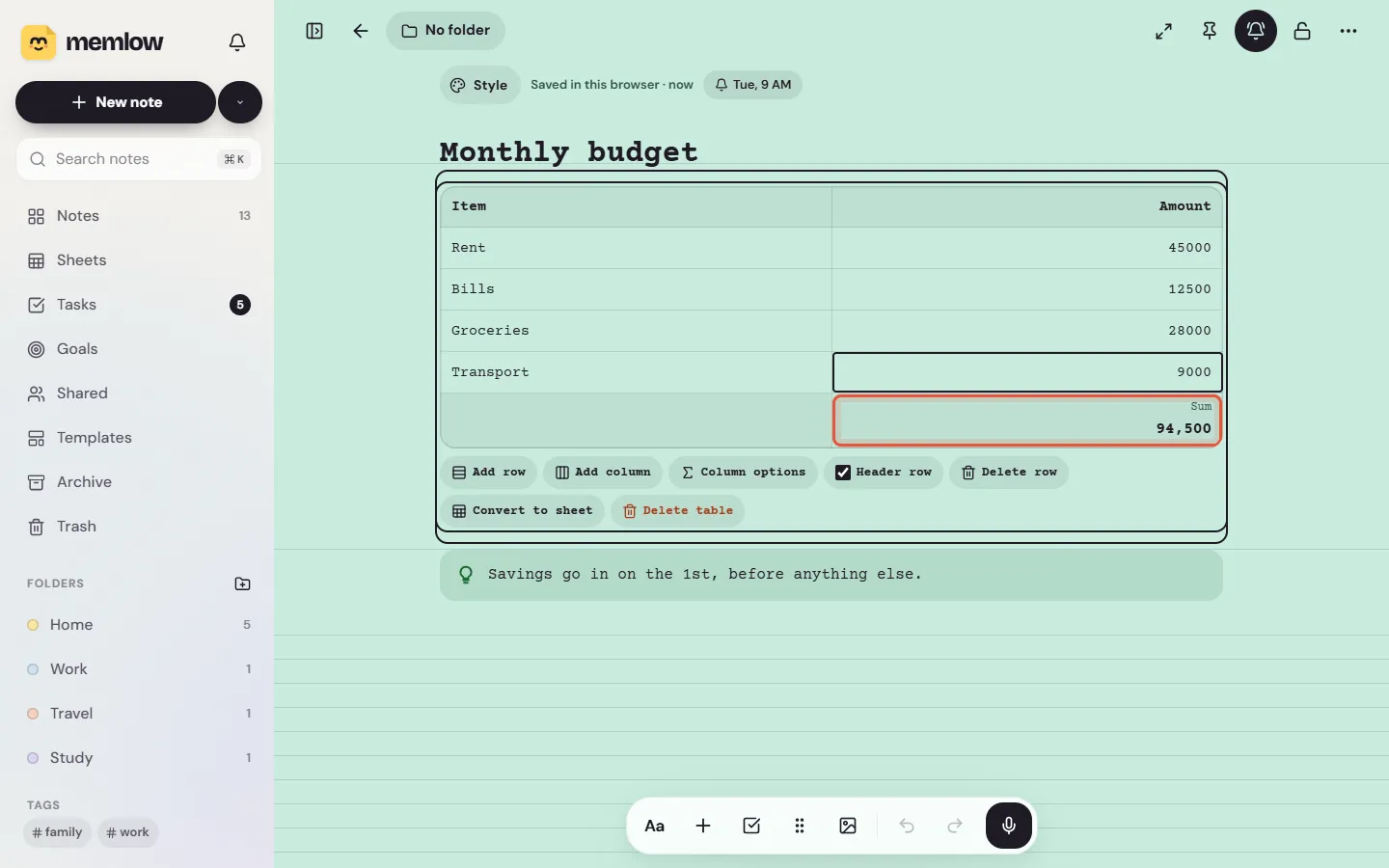
Tables in notes are for small grids of words and numbers: a budget, a timetable, who owes what. Type /table on an empty line, or tap + and choose Table, and Memlow adds a header row and two rows of three columns. Any column can show a total under it, worked out from the numbers you type.
Add a table
- Put the cursor on an empty line.
- Type
/tableand pickTable. Or tap+in the toolbar and chooseTable, underTables and media. - Type in the first cell. Enter moves to the cell below and adds a row at the end. On Android,
Nexton the keyboard moves to the next cell.
Cells hold plain text: no bold or lists inside them.
Add or remove rows and columns
On Android
Put the cursor in a cell. A bar of table tools shows above the keyboard:
Row below,Row above,Column afterandColumn beforeadd one.Delete rowandDelete columnremove the one the cursor is in, withUndo.Header rowturns the bold first row on or off.Alignmentsets the column to start, centre or end.
A table can have up to 20 columns and 200 rows. Wider tables scroll sideways.
On the web
Under the table are its tools:
Add rowandAdd columnadd one after the cell you're in.Delete rowremoves the row you're in.Column optionsholds the column's alignment, its total andDelete column.Header rowturns the bold first row on or off.Delete tableremoves the whole table.
To delete a whole table on Android, put the cursor in a cell and use the ⋮⋮ button (Block actions), then Delete block.
Show a total under a column
A total can add up a column, find its average, count its filled cells, or show its smallest or largest number. The totals row appears under the table as soon as one column has one.
On Android
- Put the cursor in the column.
- Tap
Totalin the table tools. - Choose
Sum,Average,Count,SmallestorLargest.No totaltakes it away.
On the web
- Put the cursor in the column and choose
Column options. - Pick
Sum,Average,Count,MinorMaxfrom the list.No totaltakes it away.
Memlow reads the first number in each cell, so "Rs 1,200", "12.5 kg" and Urdu or Arabic digits such as ۱۲۰۰ all count. The header row is left out. Totals are worked out on the screen each time, so they're always up to date, and they have no formulas.
When to use a sheet instead
A table is quick and simple. A sheet is a full spreadsheet inside your note, for when you need more:
| You want | Use |
|---|---|
| A short list with a total | A table |
| Formulas, such as =SUM(B2:B9) or a percentage | A sheet |
| Charts | A sheet |
| Sorting, filters or many rows | A sheet |
To turn a table into a sheet, put the cursor in it and choose Convert to sheet. The header row stays bold and frozen at the top, and the totals become formulas. Insert a new one with /sheet, or from +, then Sheet. See Get started with Memlow Sheets and Formulas and functions in Sheets.
Questions and answers
How do I add a table to a note?
Type /table on an empty line and pick Table, or tap + in the toolbar and choose Table. Memlow adds a header row and two rows of three columns.
Can a table add up a column?
Yes. Choose Total on Android, or Column options on the web, and pick Sum. Average, Count and the smallest or largest number work too.
When should I use a sheet instead?
When you need formulas, charts, sorting or a lot of rows. Convert to sheet turns a table into one, and keeps your totals as formulas.