
Formulas and functions in Sheets
A formula starts with =. Type =SUM(B2:B10) in a cell and press Enter, and the cell shows the total of B2 to B10. Memlow Sheets has 108 functions, the same on Android and the web, and they mean what they mean in Google Sheets. This page shows the common ones with examples, then the full spreadsheet formulas list at the end.
Formulas are worked out on your device, so they work offline. Change a number and every formula that uses it updates at once.
Write a formula
- Select a cell and type =.
- Start typing a function's name. Memlow suggests matching functions; pick one, or keep typing.
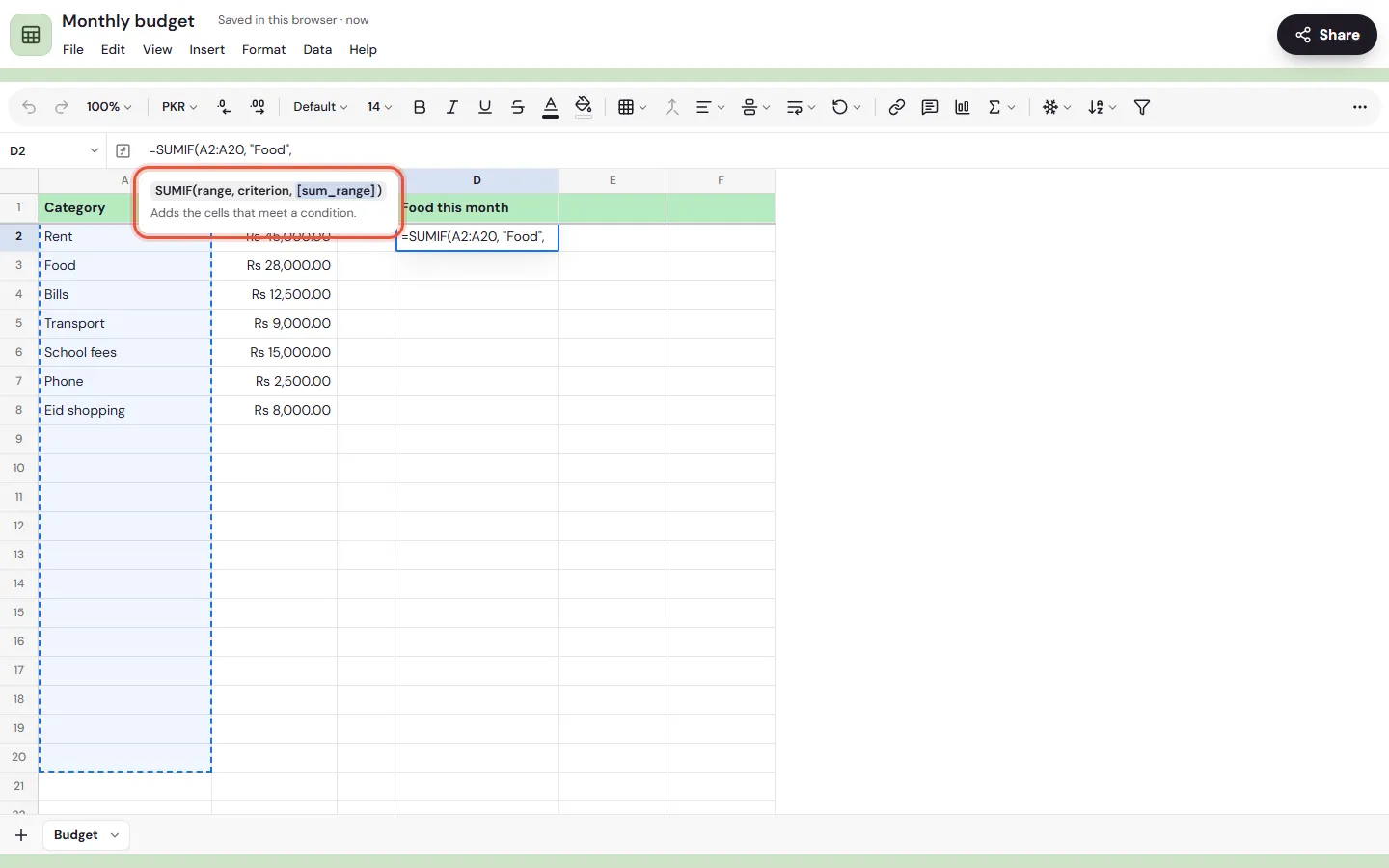
- A hint shows what goes in the brackets, with the part you're on marked.
- To use a cell, type its name (
B2), or tap or click it while you write. Drag across cells for a range. - Press Enter, or tap the tick on Android.
To see every formula instead of its result, use View, then Formulas. Help, then Functions list lists them all with a search box.
Cells, ranges and other tabs
| You write | It means |
|---|---|
B2 | One cell |
B2:B20 | Every cell from B2 to B20 |
B:B | The whole of column B |
$B$2 | Always B2, even when the formula is copied or filled |
Budget!B2 | B2 on the tab called Budget |
'Term 2'!B2 | B2 on a tab whose name has a space |
You can join text with &, compare with =, <>, <, >, <= and >=, and do sums with +, -, *, / and ^.
Note
In languages that write decimals with a comma, such as German, French, Spanish, Russian or Turkish, put ; between a function's parts: =SUMIF(A2:A20; "Food"; B2:B20). Memlow shows formulas that way in those languages.
The functions you'll use most
These examples use a monthly budget (items in A, amounts in B), a class's marks and a shop's price list.
Adding up and counting
| Formula | What it gives |
|---|---|
=SUM(B2:B20) | The month's total spending |
=SUMIF(A2:A20, "Food", B2:B20) | What went on food |
=AVERAGE(C2:C31) | A class's average mark |
=MAX(C2:C31) and =MIN(C2:C31) | The highest and lowest mark |
=COUNT(B2:B20) | How many cells hold numbers |
=COUNTIF(D2:D31, "Present") | Days marked present |
=ROUND(B2*0.18, 0) | 18% of B2, rounded to a whole number |
SUMIFS, COUNTIFS and AVERAGEIFS take several conditions. A condition can be text ("Food"), a comparison (">5000") or use * and ? as wildcards.
Making decisions
| Formula | What it gives |
|---|---|
=IF(C2>=50, "Pass", "Fail") | Pass or Fail by the mark |
=IFS(C2>=80, "A", C2>=65, "B", TRUE, "C") | A grade from several bands |
=IFERROR(B2/C2, 0) | 0 instead of an error when C2 is empty |
=AND(B2>0, C2="Paid") | TRUE only when both are true |
Looking things up
| Formula | What it gives |
|---|---|
=VLOOKUP("Sugar", A2:C50, 3, FALSE) | Sugar's price from the third column of a price list |
=XLOOKUP("Sugar", A2:A50, C2:C50) | The same, without counting columns |
=INDEX(C2:C50, MATCH("Sugar", A2:A50, 0)) | The same again, the classic way |
Text
| Formula | What it gives |
|---|---|
=A2 & " " & B2 | First and last name together |
=TEXTJOIN(", ", TRUE, A2:A10) | A list in one cell, empty cells left out |
=PROPER(A2) | "ali khan" as "Ali Khan" |
=TRIM(A2) | The text without extra spaces |
Dates
| Formula | What it gives |
|---|---|
=TODAY() | Today's date |
=DATEDIF(B2, TODAY(), "Y") | Someone's age in years, from a birth date in B2 |
=NETWORKDAYS(B2, C2) | Working days between two dates |
=EDATE(B2, 1) | The same day next month, for a bill's due date |
Lists that fill cells for you
=UNIQUE(A2:A100), =SORT(A2:B20, 2, FALSE) and =FILTER(A2:C100, C2:C100>1000) give a list, not one value. The result spills into the cells below and beside the formula. Leave those cells empty, or the formula shows #REF!.
Money and links
=PMT(0.15/12, 24, -100000) gives the monthly payment on a loan of 100,000 at 15% a year over 24 months. =HYPERLINK("https://memlow.com", "Memlow") puts a link in a cell, and =SPARKLINE(B2:M2) draws a small line chart inside one.
Named ranges
Give an area a name and use the name instead of its address: =SUM(Expenses) reads better than =SUM(B2:B40).
- Select the cells.
- Open
Data, thenNamed ranges. - Choose
Add a named range, type a name such asExpensesand save.
Names use letters, digits and _, with no spaces, and can't look like a cell (so not A1). Rename a range and the formulas that use it change with it.
When a formula shows an error
Select the cell to see what the error means under the formula bar.
| Error | What Memlow says | What to check |
|---|---|---|
#DIV/0! | Divided by zero. | The cell you divide by is empty or 0. Wrap the sum in IFERROR. |
#REF! | A cell it uses is gone, or a result has no room to spill. | A row or tab was deleted, or cells below a list formula aren't empty. |
#VALUE! | A value of the wrong kind, like text where a number is needed. | A number typed with letters in it, or a date Memlow didn't read as a date. |
#NAME? | An unknown function or name. | A typo in the function's name, or a named range that doesn't exist. |
#N/A | Not found. | VLOOKUP, XLOOKUP or MATCH didn't find what you looked for. |
#NUM! | A number that can't be worked out. | Something like the square root of a negative number. |
#CYCLE! | The formula depends on its own result. | The formula uses its own cell, directly or through other cells. |
#ERROR! | The formula can't be read. | A bracket or quote isn't closed. |
When you finish typing a formula Memlow can't read, it also tells you why, for example "A bracket isn't closed." or "There's no tab with that name."
How Memlow differs from Google Sheets
Functions work as they do in Google Sheets, with a few small differences:
- A range in a sum spills on its own (
=B2:B10*2fills ten cells), soARRAYFORMULAis rarely needed. TODAYandNOWuse your device's clock.
Every function
Note
This table is generated from the list of functions in Memlow's own code (24 October 2026), so it matches the app. Android and the web have the same 108.
| Group | Functions |
|---|---|
| Math (16) | SUM, SUMIF, SUMIFS, SUMPRODUCT, ROUND, ROUNDUP, ROUNDDOWN, CEILING, FLOOR, INT, ABS, MOD, POWER, SQRT, RAND, RANDBETWEEN |
| Statistics (24) | AVERAGE, AVERAGEIF, AVERAGEIFS, MEDIAN, MODE, MIN, MINIFS, MAX, MAXIFS, COUNT, COUNTA, COUNTBLANK, COUNTIF, COUNTIFS, COUNTUNIQUE, LARGE, SMALL, RANK, PERCENTILE, QUARTILE, STDEV, STDEV.P, VAR, VAR.P |
| Logic (9) | IF, IFS, IFERROR, IFNA, AND, OR, NOT, SWITCH, CHOOSE |
| Lookup (7) | VLOOKUP, HLOOKUP, XLOOKUP, INDEX, MATCH, ROWS, COLUMNS |
| Text (18) | CONCAT, TEXTJOIN, JOIN, SPLIT, LEFT, RIGHT, MID, LEN, TRIM, UPPER, LOWER, PROPER, SUBSTITUTE, TEXT, VALUE, REGEXMATCH, REGEXEXTRACT, REGEXREPLACE |
| Date and time (17) | TODAY, NOW, DATE, TIME, YEAR, MONTH, DAY, HOUR, MINUTE, SECOND, WEEKDAY, DAYS, DATEDIF, EDATE, EOMONTH, NETWORKDAYS, WORKDAY |
| Money (5) | PMT, FV, PV, NPV, RATE |
| Arrays (6) | UNIQUE, SORT, FILTER, SEQUENCE, TRANSPOSE, ARRAYFORMULA |
| Information (4) | ISBLANK, ISNUMBER, ISTEXT, ISERROR |
| Web (2) | HYPERLINK, SPARKLINE |
Questions and answers
Which functions are there?
108, in ten groups: math, statistics, logic, lookup, text, date and time, money, arrays, information and web. They're listed in full at the end of this page, and in Help, then Functions list, in any sheet.
How do I write a formula?
Select a cell, type = and the formula, for example =SUM(B2:B10), then press Enter. Tap or click cells while you type to put them in.
What do the errors mean?
Select the cell: Memlow says what went wrong under the formula bar. The table above lists every error with what to check.
Does Memlow use AI to write formulas?
No. There's no AI in Memlow. Smart fill offers to finish a column only when your examples follow a simple fixed rule, like taking the first word.