
Back up your notes to Google Drive
To back up your notes to Google Drive, link Memlow to your own Google account and choose a backup password. Memlow encrypts everything on your device with that password before it goes up, into a hidden Memlow folder in your Drive. After that it backs up by itself, and your notes can come back on a new phone or another computer.
Drive backup is free. The backups use your own Google Drive storage, and Memlow can see only its own folder there, never your other files.
Turn on Drive backup
On Android
- Open
Settings. UnderBackup and data, tapGoogle Drive backup. - Tap
Choose Google account. In Google's window, pick your account and allow Memlow's folder. - If this Drive has no Memlow backups yet,
Create a backup password: at least 8 characters, typed twice. Write it down somewhere safe. - If the Drive already has your backups, Memlow says
Your backups are already here. ChooseType your backup password, orApprove from another deviceif you're signed in to your Memlow account. Don't make a new password: your other devices would need it. - Under
How often?, chooseDaily,WeeklyorManually, and leaveBack up over Wi-Fi onlyon if you want to save mobile data. - Tap
Turn on and back up now. Memlow says "Your notes are backed up" when the first backup is done.
On Android you don't need a Memlow account for Drive backup.
On the web
On the web, Google Drive comes with a free Memlow account. Sign in first, with a confirmed email address.
- Open
Settings, thenStorage and Google Drive. - Choose
Link Google Drive. In Google's window, pick your account and allow Memlow's folder. - If this Drive has no Memlow backups yet,
Create a backup password: at least 8 characters, typed twice. Then chooseTurn on and back up now. - If the Drive already has backups, from your phone for example, type their backup password and choose
Open my backups. Or chooseApprove on another deviceif Memlow offers it.
Your notes are then on both, and stay in step. See Same notes on your phone and computer.
You link Google Drive once. Your Memlow account keeps Google's permission, so when you sign in again, or sign in on another computer, Memlow connects to the same Drive by itself. It asks only for your backup password, or for approval from another signed-in device. With Remember my backup key in my account turned on, it asks nothing.
Warning
Memlow can't recover your backup password, and without it nobody can open your backups, us included. Read how the backup password works before you choose one.
When Memlow backs up
Once Drive backup is on, there are two kinds of copies in your Drive:
- Each note on its own: a change goes up a moment after you make it, as that note's own small encrypted file. This is how your other devices get it within seconds.
- Full backups: everything in one encrypted file. They're the copies you restore from.
On Android
Full backups follow your changes, a short while after you stop writing, and also run on your schedule: Daily or Weekly. With Manually, a full backup runs only when you tap Back up now; your notes still sync one by one.
Back up over Wi-Fi only holds full backups until you're on Wi-Fi. Scheduled backups also wait while the battery is low. In the background, the phone checks Drive for changes every 15 minutes.
On the web
Memlow backs up while it's open in a tab or installed as an app. There's no schedule to set. Your Memlow account keeps Drive connected, so this carries on after you close and reopen Memlow, and after you sign out and back in.
Back up now
Before you change phones, or after a big change, back up by hand:
- On Android:
Settings, thenBack up now(underGoogle Drive backup). - On the web:
Settings, thenStorage and Google Drive, thenBack up now.
Where the backups are, and how many
The backups are in a hidden app folder in your Drive, so you won't see them in your files. Memlow lists them for you:
- On Android, in
Settings, thenRestore from a backup, thenGoogle Drive. The Drive backup screen also shows how much of your Drive storage they use. - On the web, under
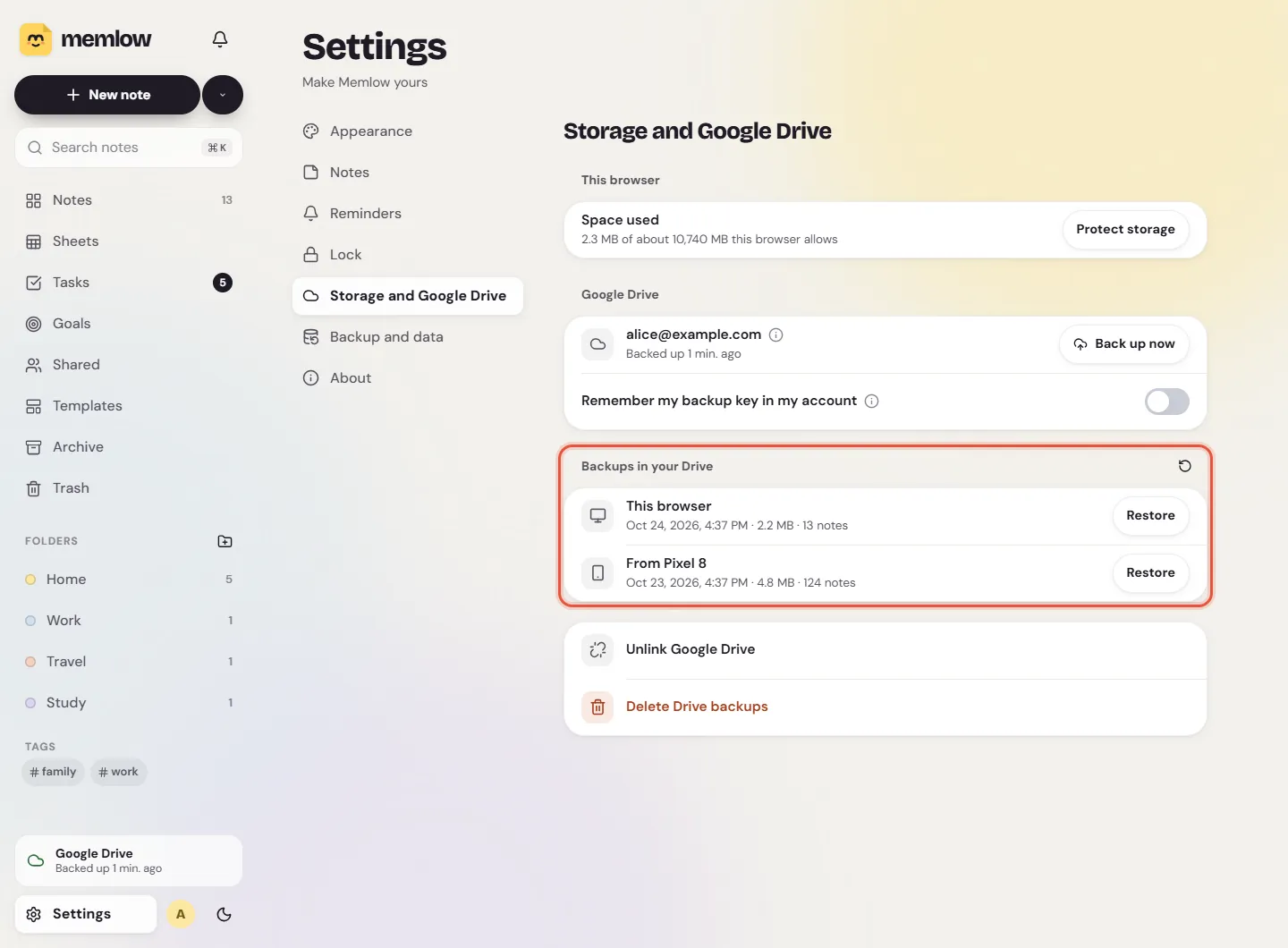
Backups in your DriveinSettings, thenStorage and Google Drive, each with the device that made it.
Each device keeps its own three newest full backups. On Android it also keeps the newest one of each earlier day, until three days are covered, so yesterday's version can still be restored. Older ones are deleted only after a new backup has been uploaded and checked.
Change, pause or stop
Change backup password(Android): new backups use the new password; older ones still open with the old one.Turn off Drive backup(Android) orUnlink Google Drive(web) stops backing up from that device. The backups already in Drive stay, and still open with your password.Delete Drive backupsdeletes every Memlow backup in your Drive, from all your devices. See Delete your notes, backups and account.
If a backup fails, Memlow tells you why: no connection, Google asking to connect again, or a full Drive. See Google Drive backup failed.
Questions and answers
How do I link Drive?
On Android, Settings, then Google Drive backup, then Choose Google account. On the web, sign in to your Memlow account, then Settings, Storage and Google Drive, Link Google Drive. Then choose or enter your backup password.
How often does it back up?
Each note syncs a moment after you change it. Full backups follow your changes too, plus a daily or weekly one on Android (or only when you tap Back up now, with Manually). On the web it backs up while Memlow is open.
Where are the files?
In a hidden Memlow folder in your own Google Drive, encrypted. You won't see them among your files; Memlow lists them under Restore from a backup (Android) or Backups in your Drive (web).
How many backups are kept?
The three newest full backups of each device. On Android, also the newest of each earlier day until three days are covered.
Can Google read my backups?
No. They're encrypted on your device with your backup password before they're uploaded. See Where your notes live and what's encrypted.