
Notes kept in this browser: keep them safe
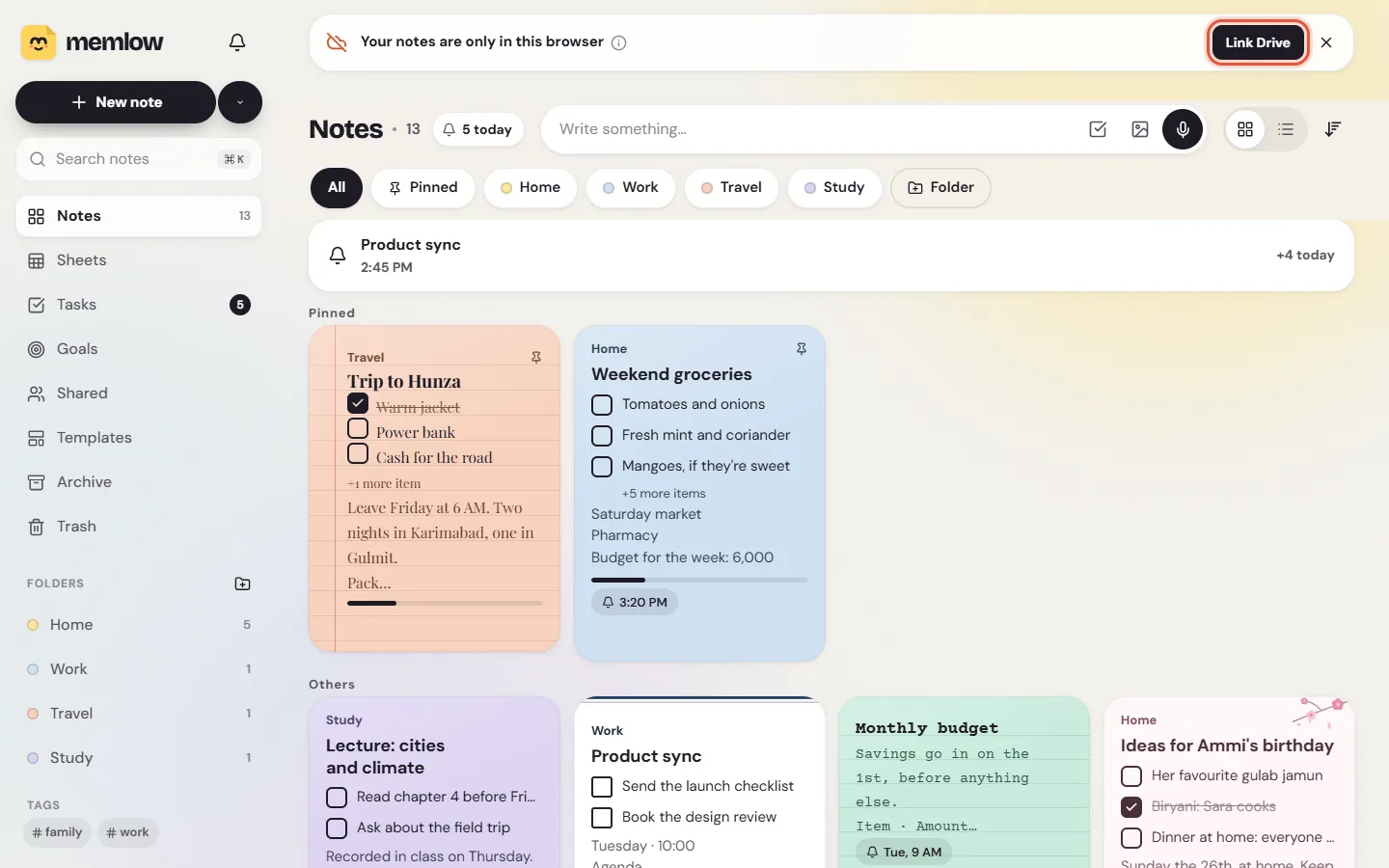
On the web, Memlow keeps your notes saved in the browser, on this one device. The warning "Your notes are only in this browser" means nothing else has a copy yet. Link Google Drive, or save a backup file now and then, and your notes are safe even if the browser forgets them.
What the warning says
A banner sits above your notes list: "Your notes are only in this browser", with Link Drive. Its (i) explains: "Clearing browser data or using another computer would leave them behind. Link Google Drive to keep them safe and encrypted."
- It shows on Home, a folder or a tag, once you have notes.
- The close button at its end (
Remind me later) hides it for three days. - It goes away for good once Google Drive is linked.
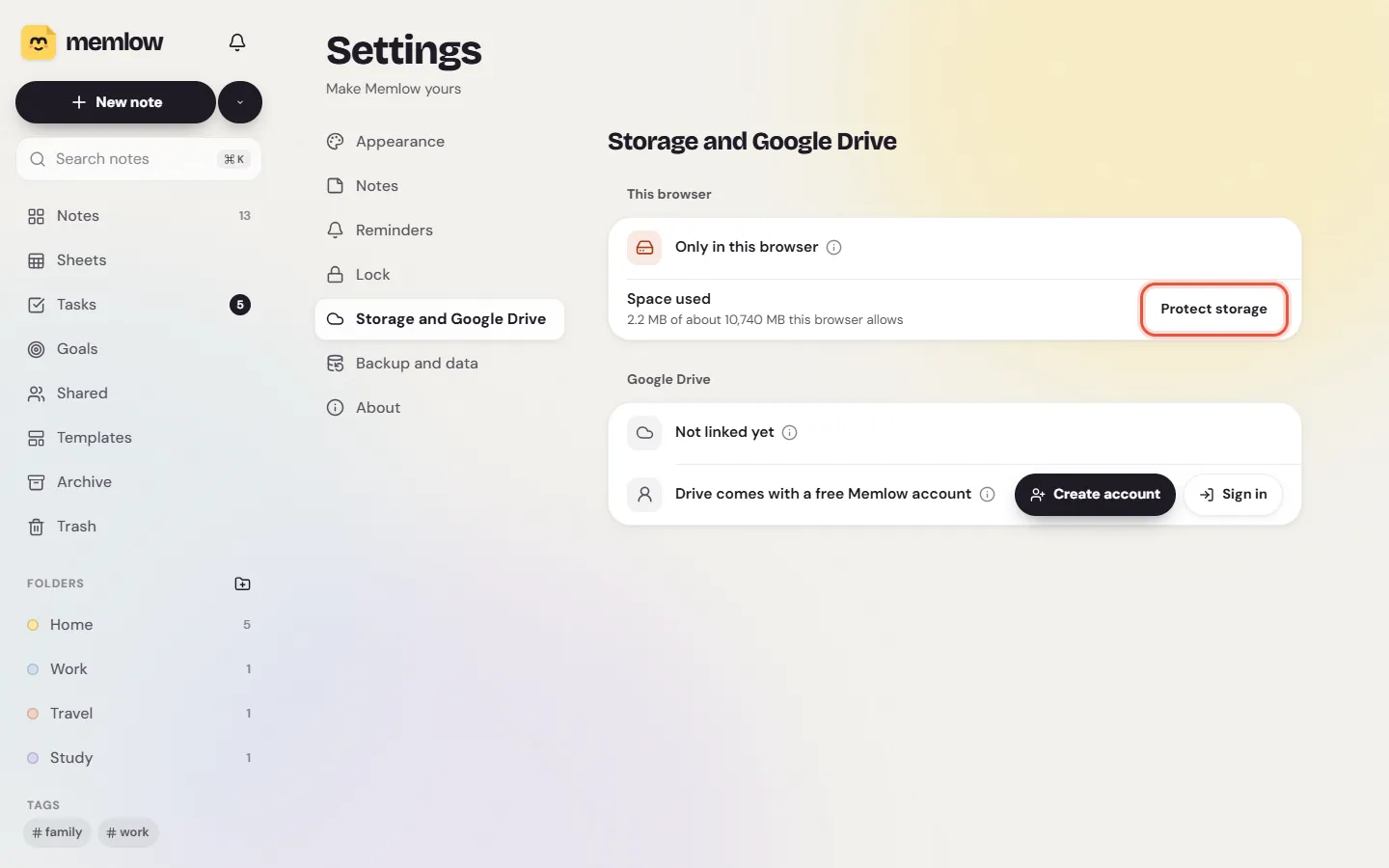
In Settings, then Storage and Google Drive, the This browser panel says the same with an Only in this browser row.
What can clear notes kept in a browser
Your notes are in the browser's storage for app.memlow.com. These can delete them:
- Clearing browsing data with cookies and site data ticked, for all time or for app.memlow.com.
- A private or incognito window. Everything written there goes when the window closes.
- Cleaning apps and browser resets that wipe site data.
- The browser itself, when the disk is nearly full and Memlow's storage isn't protected. Some browsers also clear sites you haven't opened for a while.
Erase Memlow from this browserinSettings,Backup and data.
Notes also don't follow you to another browser, another browser profile or another computer. They're still in the first one.
Warning
Don't keep notes in a private window. They're deleted the moment you close it.
Keep them safe with Google Drive
This is the best fix. Memlow encrypts your notes with your backup password and keeps a copy in a hidden folder in your own Google Drive. The same notes then open on your other computers and in the Android app. It needs a free Memlow account.
- Choose
Link Driveon the banner, or openSettings, thenStorage and Google Drive. - Choose
Link Google Driveand pick your Google account. - Create a backup password, and keep it somewhere safe. Memlow can't recover it.
- Choose
Turn on and back up now.
For the full steps, see Back up your notes to Google Drive.
Or save a backup file now and then
A backup file holds every note, photo and recording in one file you keep, for example on a USB stick.
- Open
Settings, thenBackup and data. - Next to
Backup file, chooseDownload. - Leave
Protect with a passwordon, and choose a password. - Choose
Save backup file.
Save a new one after you've written a lot. See Save and restore a backup file.
Ask the browser to protect Memlow's storage
- Open
Settings, thenStorage and Google Drive. - The
Space usedrow shows how many MB Memlow uses, of about how many this browser allows. Next to it, chooseProtect storage. - Memlow says "This browser will keep Memlow's data when space runs low", and the row shows
Protected.
The browser decides this itself. If it says "The browser decides this itself; installing Memlow as an app usually helps", install the web app and try again. Protection helps when space runs low. It doesn't stop you or a cleaning app from clearing site data.
Still have questions?
Write to [email protected] with your browser and its version, your computer, and a screenshot of Settings, Storage and Google Drive. If notes are already missing, see Can't find a note? first.
Questions and answers
Why does Memlow warn that notes are only in this browser?
On the web, notes are saved in the browser on this device, and nothing else has a copy until you link Google Drive or save a backup file. Clearing the browser's data would delete them.
What clears them?
Clearing cookies and site data, closing a private window, cleaning apps, a browser reset, or the browser freeing space on a full disk. Another browser or computer doesn't have them at all.
How do I keep them safe?
Link Google Drive in Settings, Storage and Google Drive. Or save a backup file in Settings, Backup and data. Then choose Protect storage, and install the web app if the browser asks for that.