
Reminders don't ring, or ring late
When reminders are not working on Android, a phone setting is almost always the cause. Notifications are off, exact alarms aren't allowed, or a battery saver stops Memlow in the background. Memlow can check all three for you and open the right page of your phone's settings. On the web, reminders ring only while Memlow is open.
What you might see
- A reminder never shows up at its time.
- It shows up late, sometimes by as much as an hour.
- It shows up without a sound.
- It rings the next time you open Memlow, with a title that starts "Missed:".
- Tasks shows a banner such as "Notifications are off", "Reminders may be late. Allow Alarms & reminders for on-time alerts." or "Your phone restricts Memlow in the background, so reminders may not ring."
Check your reminder settings in one place
Memlow looks at the three settings that decide whether a reminder rings, and tells you which one is off.
- Open
Settingsfrom the bar along the bottom. - Under
Notes, tapReminders not ringing?. - The sheet
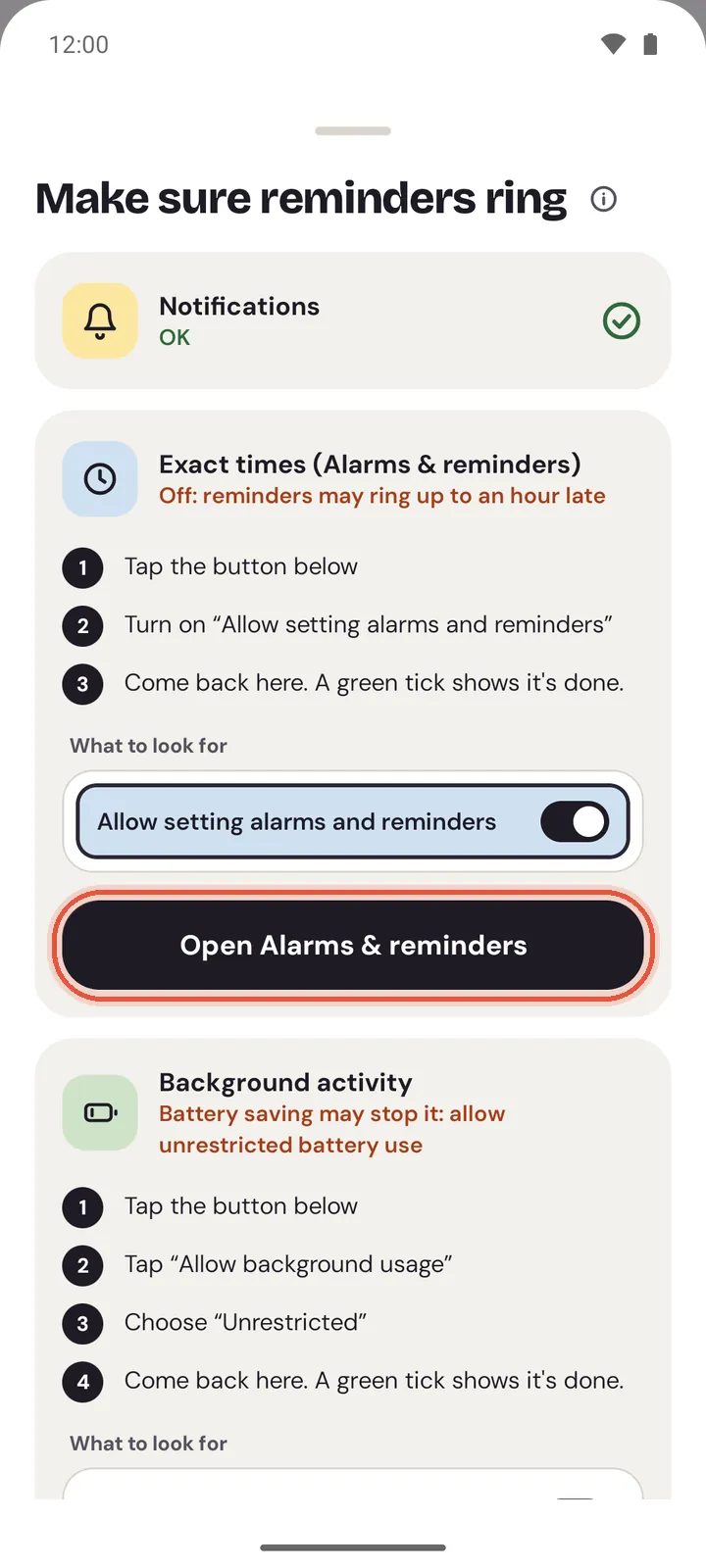
Make sure reminders ringshows three cards:Notifications,Exact times (Alarms & reminders)andBackground activity. A card with a problem says what's wrong, for example "Off: reminders can't show". - Tap the button on that card. Memlow opens the page in your phone's settings and shows what to look for.
- Change the setting, then come back to Memlow. A green tick shows it's done.
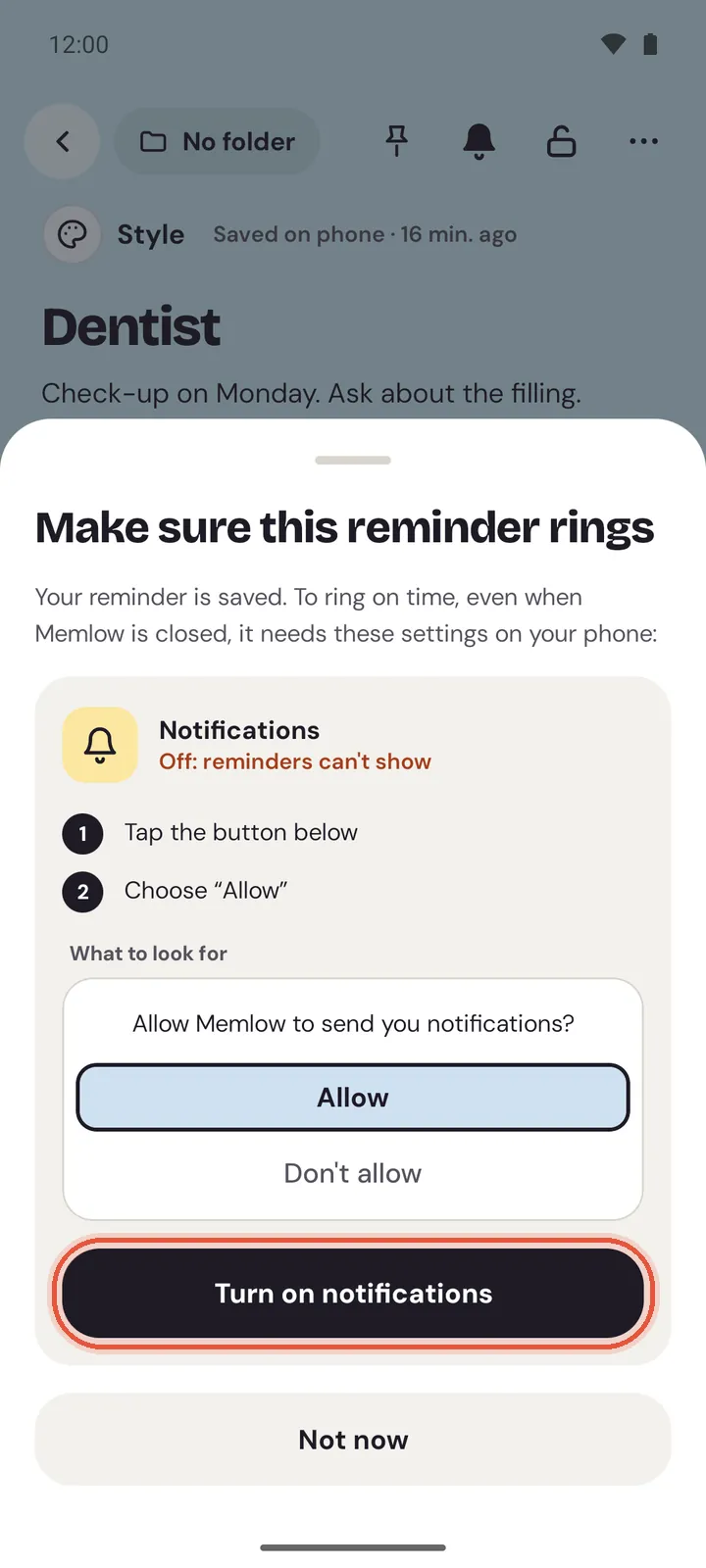
Memlow also checks when you save a reminder. If something would stop it, the sheet Make sure this reminder rings opens. Your reminder is saved either way.
Notifications are off
This is the most common cause. Without notifications, a reminder can't show at all. It still waits in Tasks.
- Open
Settings, thenReminders not ringing?, and tapTurn on notifications. - On Android 13 and newer, Android may ask "Allow Memlow to send you notifications?". Choose
Allow, and you're done. - If you chose
Don't allowbefore, the button opens Memlow's notification settings instead. Turn onAll Memlow notifications(on Android 12 and older,Show notifications). - Check that the
Reminderscategory is on as well. It can be turned off on its own, and then only reminders go quiet. - Come back to Memlow.
Exact alarms aren't allowed
On Android 12 and newer, an app needs permission to ring at an exact minute. Without it, the card says "Off: reminders may ring up to an hour late". Android 14 and newer don't give this permission to newly installed apps, so many people see this one.
- In
Reminders not ringing?, tapOpen Alarms & reminders. - Turn on
Allow setting alarms and reminders. - Come back to Memlow.
You can also find it yourself: search your phone's settings for "Alarms & reminders" and pick Memlow.
Battery saving stops Memlow
Android can hold back apps it thinks you don't need. The card says "Restricted: reminders may not ring" or "Battery saving may stop it: allow unrestricted battery use".
- In
Reminders not ringing?, tapOpen battery settings. - On Android 14 and newer, tap
Allow background usage, then chooseUnrestricted. - On Android 12 and 13, choose
Unrestricted. - On Android 9 to 11, if Memlow is restricted, tap
Battery, thenBackground restriction, thenRemove. - On Android 8 to 11 otherwise, tap
Not optimized, pickAll apps, find Memlow and chooseDon't optimize.
Your phone maker's own battery saver
Some phones stop apps beyond Android's own settings. If reminders still come late or not at all, change your phone maker's setting too. Memlow's Background activity card shows the tip for your phone. Menu names change between versions, so look for the closest match.
- Xiaomi, Redmi and POCO: in Memlow's
App info, setBattery savertoNo restrictionsand turn onAutostart. You can also lock Memlow in recent apps so clearing them leaves it alone. - Samsung: open your phone's
Settings, thenBattery(on older models,Battery and device care, thenBattery), thenBackground usage limits. OpenNever sleeping apps, tap+, pick Memlow and tapAdd. Make sure Memlow isn't inSleeping appsorDeep sleeping apps. - OPPO, realme and OnePlus: in
App info, openBattery usageand turn onAllow background activityandAllow auto launch. - vivo and iQOO: in
App info, openBattery, allowHigh background power consumption, and turn on Autostart. - Huawei and Honor: open
Settings, thenBattery, thenApp launch. Set Memlow to manage manually and turn on all three switches. - Infinix, Tecno and itel: in Phone Master, turn on Memlow under
Auto-start.
On any phone, try not to swipe Memlow away from recent apps.
Note
If the phone stops Memlow anyway, its reminders ring the next time you open it, marked "Missed".
It rings, but without a sound
Android's own quiet settings can silence a reminder that did arrive.
- Check that Do Not Disturb is off, or that it lets Memlow through.
- Check that your phone isn't on silent or vibrate.
- In your phone's settings for Memlow's notifications, open the
Reminderscategory and check its sound.
Why some reminders say "Missed"
A reminder rings late, with "Missed:" before its title, when your phone was off at its time, or when the phone had stopped Memlow. Memlow rings it as soon as it can, so you still hear about it. It's also in the bell at the top of Home, under Notifications.
Reminders on the web
On the web, reminders ring while Memlow is open in a tab or installed as an app. A reminder you miss shows up in the bell when you come back. For reminders that always ring, use the Android app.
- Open
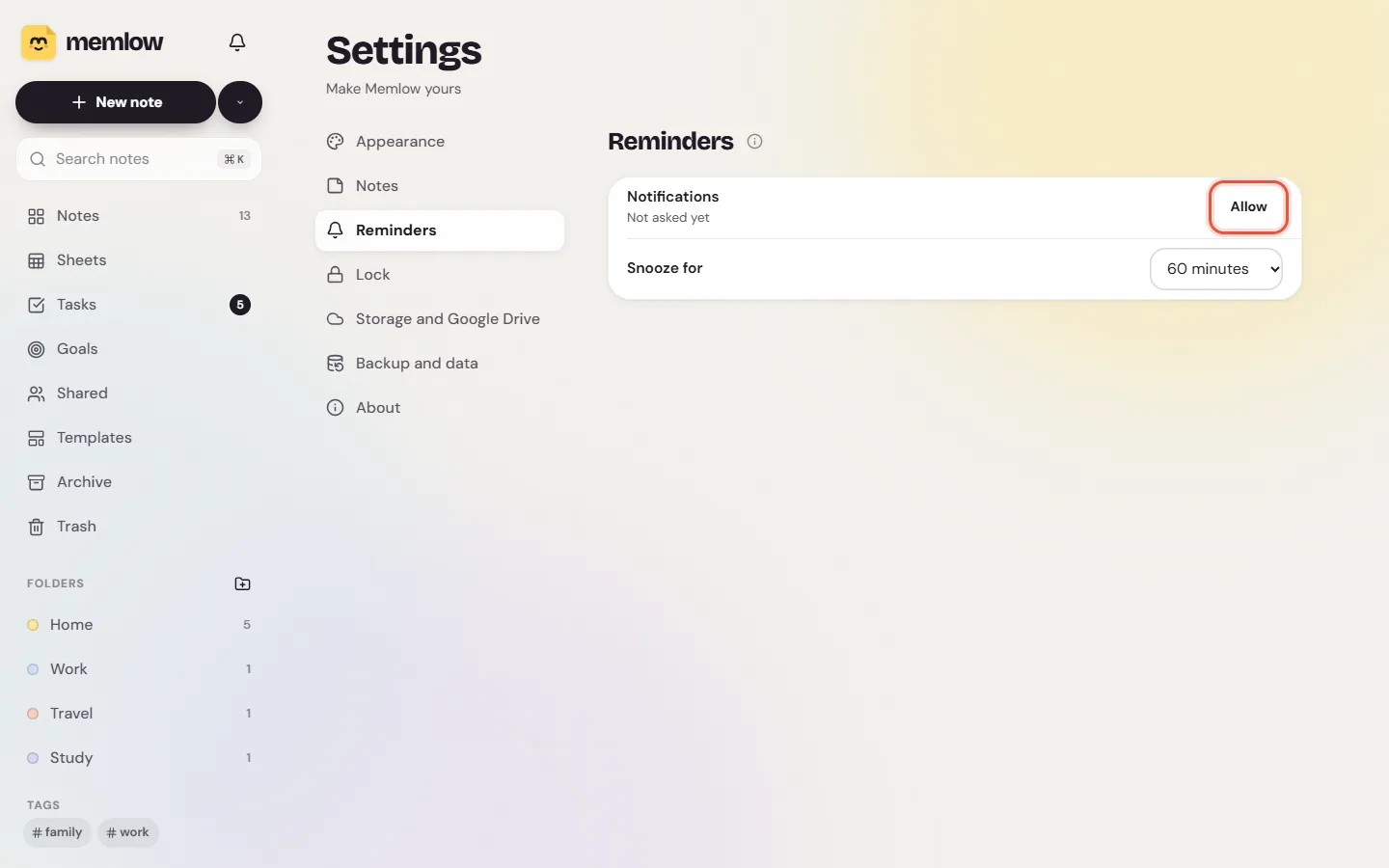
Settings, thenReminders. - Look at the
Notificationsrow. If it saysNot asked yet, chooseAllow, then allow notifications when the browser asks. - If it says "Blocked in the browser's site settings", open the site settings for app.memlow.com. It's the icon at the start of the address bar. Set notifications to allow, then reload the page.
- Keep a Memlow tab open, or install the web app.
- Check that your computer's own focus or do-not-disturb mode isn't hiding notifications.
Still not working?
Write to [email protected]. Please include:
- your Memlow version (
Settings, thenAbout, thenVersion); - your phone's make, model and Android version;
- a screenshot of the
Make sure reminders ringsheet; - when the reminder should have rung, and when it did (or that it didn't).
There's no need to send your PIN or the text of the note. For how reminders work in general, see Set, repeat and snooze reminders.
Questions and answers
Which settings stop reminders?
Three phone settings: notifications for Memlow, exact alarms (Alarms & reminders) and battery use. Open Settings, then Reminders not ringing?, to see which one is off. Some phones from Xiaomi, Samsung, OPPO, realme and vivo also have their own battery saver.
What are exact alarms?
On Android 12 and newer, apps need the Alarms & reminders permission to ring at an exact minute. Without it, Android may hold a reminder back by up to an hour.
Why are some reminders marked Missed?
Your phone was off at the reminder's time, or it had stopped Memlow to save battery. Memlow rings the reminder as soon as it can, with "Missed:" before its title.
Do reminders ring on the web when the tab is closed?
No. On the web they ring while Memlow is open in a tab or installed as an app. Missed ones wait in the bell. For reminders that always ring, use the Android app.