
Set, repeat and snooze reminders
You can set a reminder on a note, or on one item of a checklist, from the bell at the top of the note. Pick a time, choose whether it repeats, and save. The Android app rings it on time even when Memlow is closed; the web app rings it while Memlow is open in a tab or installed as an app.
Every reminder also shows up in Tasks, so you can see your whole day in one list.
Set a reminder on a note
On Android
- Open the note. If the keyboard is up, close it: the bell hides while you type.
- Tap the bell in the top bar.
- In
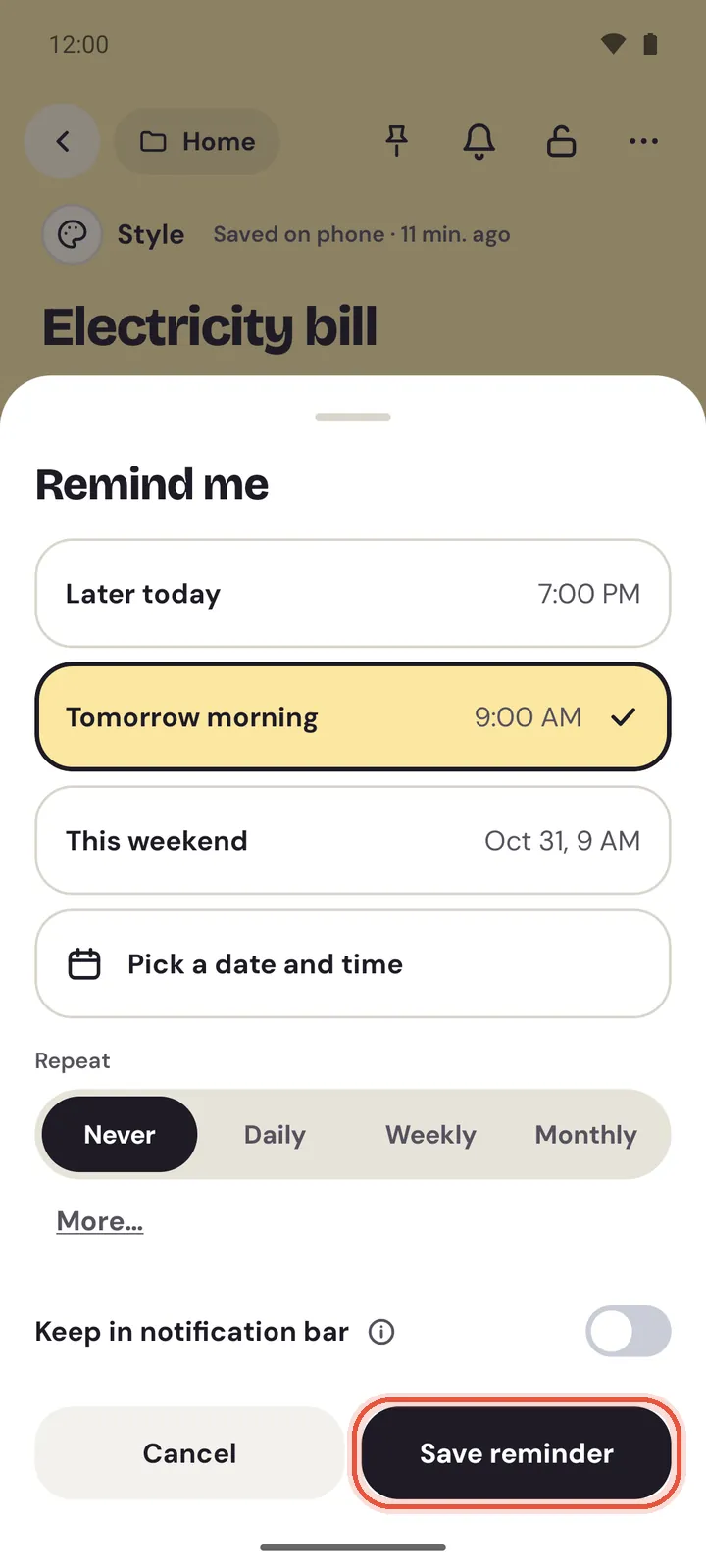
Remind me, tapLater today,Tomorrow morningorThis weekend, or tapPick a date and timeand choose a day, then a time. - Tap
Save reminder. Memlow says "Reminder set for" and the time.
If something on your phone would stop the reminder ringing, Memlow shows Make sure this reminder rings with the setting to fix. The steps are in Reminders don't ring, or ring late.
On the web
- Open the note.
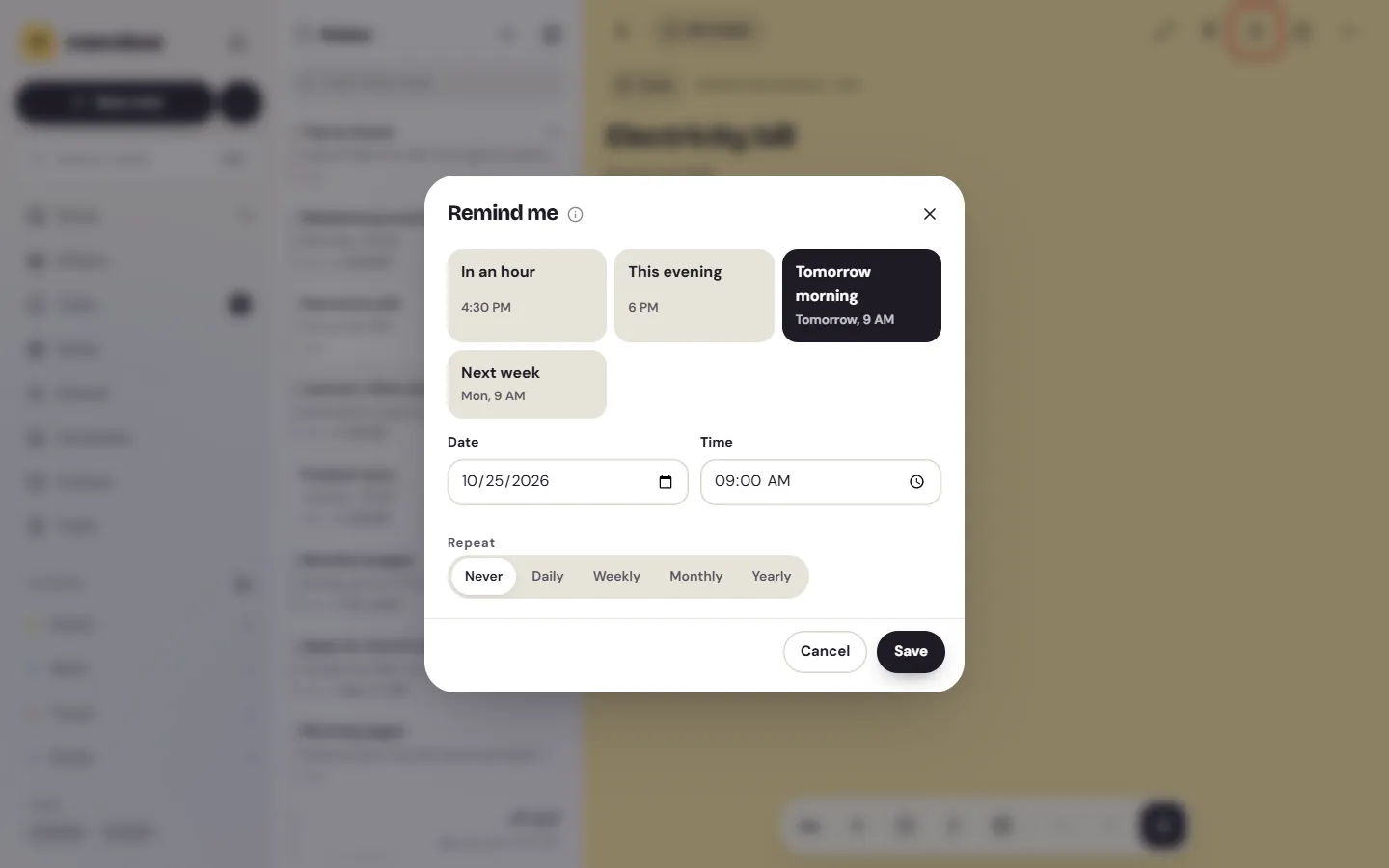
- Choose the bell in the top bar (
Add a reminder). - In
Remind me, pickIn an hour,This evening,Tomorrow morningorNext week, or type aDateand aTime. - Choose
Save.
The first time, your browser asks whether Memlow may show notifications. Choose Allow, so a reminder can pop up even when Memlow's tab isn't in front.
Note
A browser can only ring a reminder while Memlow is open in a tab or installed as an app. One you miss waits in the bell at the top until you come back. For reminders that must ring, such as an exam or a bill, use the Android app.
Remind yourself about one checklist item
A reminder on one item rings with that item's words, so "Pay the gas bill" on your grocery list rings as itself.
On Android
- Tap into the item. A small bell appears at the end of its line.
- Tap the bell and choose a time, as above.
- The item now shows its time. Tap the time to change it.
Setting a reminder on an item you've already ticked un-ticks it, so it's a to-do again.
On the web
- Open the note and choose the bell in the top bar.
- Under
About, pick the item instead ofThe whole note. - Choose a time and
Save.
Make a reminder repeat
Under Repeat, choose Never, Daily, Weekly, Monthly or Yearly. Weekly reminders can ring on several days, for example Monday, Wednesday and Friday for a gym class.
On Android
Never, Daily, Weekly and Monthly are side by side. Tap More… to see Yearly, and to choose the days for a weekly reminder under Repeat on. With no day picked, it repeats on the weekday of the date you chose.
On the web
Choose Weekly, then pick the days under it. With no day picked, it repeats on the weekday of the date you chose.
A few things work the same everywhere:
- Times stay put when you travel: a 9:00 reminder rings at 9:00 wherever you are.
- A monthly reminder on the 31st rings on the last day of shorter months.
- When a repeating reminder on a checklist item comes round again, the item un-ticks itself. It works like a to-do that comes back every week.
Snooze a reminder
Snooze pushes a ringing or late reminder back without changing the time it's set for next.
On Android
- In the notification, tap
Snooze. It uses your default length, 1 hour unless you change it inSettings, thenDefault snoozeunderNotes. - In Tasks, a late reminder has a
Snoozebutton. It offers 15 minutes, 1 hour, 3 hours orTomorrow morning.
On the web
- On the reminder's card in Memlow, or on a late reminder in Tasks or Notifications, choose
Snooze. - Set how long in
Settings, thenReminders, thenSnooze for: from 5 minutes to 4 hours.
Let Memlow offer a reminder when you type a date
Write "call the electrician tomorrow at 5" and Memlow offers to set that reminder for you. It finds dates and times with fixed rules for each language. It never sets a reminder on its own: you choose.
On Android
A card appears under the line: "Remind me" with the time it found, and where it found it. Tap Set to open the reminder sheet with that time picked, or tap the cross to dismiss it. A dismissed phrase isn't offered again in that note.
On the web
A card asks "Set a reminder:" with the time it found. Choose Set, or Not now. On a checklist item it says "Remind me of this item:" instead.
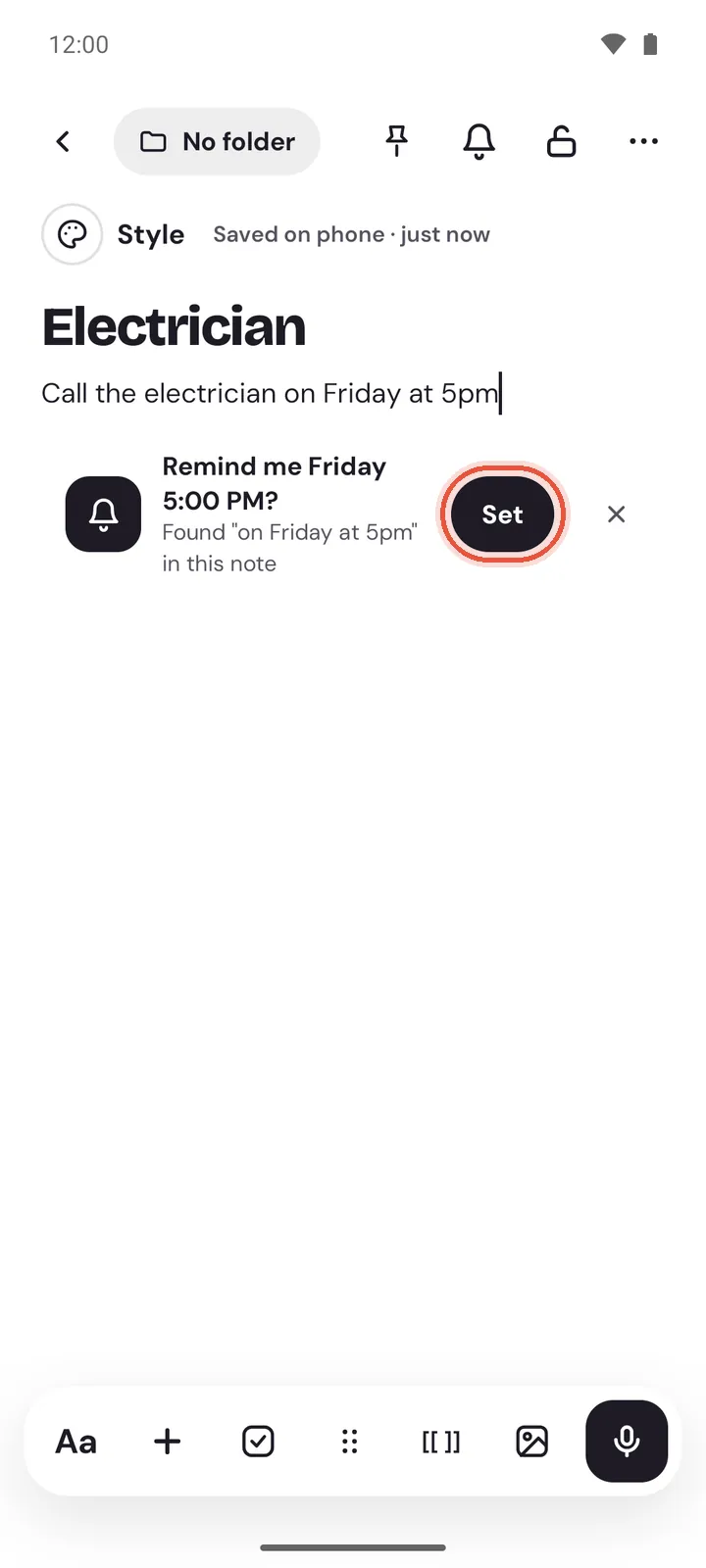
To turn these offers off, open Settings, then Notes, and switch off Suggest reminders.
Keep a reminder in the notification bar
This is on Android only. In the reminder sheet, switch on Keep in notification bar. The reminder then sits in your notifications, without a sound, from the moment you set it, with a Done button, until you tick it off. It suits a medicine you take every evening.
Change or remove a reminder
Open the note and tap the bell again. On Android, its sheet has Remove reminder at the bottom. On the web, choose Remove. To change the time, pick a new one and save.
When a reminder rings
- On Android, the notification has
DoneandSnooze. Tapping it opens the note at the item.Doneticks the item. - If the phone was off at that time, the reminder rings once when it's back, marked "Missed:".
- A reminder on a locked note says only "You have a reminder" and the time, so nobody reading your screen sees the note.
- On the web, a reminder pops up while Memlow is open and goes into the bell's list.
You can also share a reminder with a link: the people who open it are asked whether to set it for themselves.
Questions and answers
How does "tomorrow at 5" work?
As you type, Memlow looks for dates and times in the line, using rules for each language. When it finds one in the future it offers a reminder for it. You tap Set to keep it; nothing is set without you.
Can a reminder repeat every two weeks?
Not yet. A reminder can repeat daily, weekly on the days you pick, monthly or yearly.
Do reminders ring when the web app is closed?
No. A browser rings reminders only while Memlow is open in a tab or installed as an app. Missed ones wait in the bell. The Android app rings them even when it's closed.
Why didn't my reminder ring on my phone?
Usually a phone setting: notifications, exact alarms or battery saving. See Reminders don't ring, or ring late.