
Storage is full: free up space
When Memlow storage is full, it's one of four places: your sharing space (1 GB for each account), your phone, your Google Drive, or the browser's storage on the web. Each one has its own message, and its own fix. Your notes that are already saved stay safe in every case.
What you might see
- "There's no room left for shared notebooks on this account."
- "Your phone is almost full. Memlow may not save photos or voice notes." (a banner on Home, Android)
- "Couldn't save: your phone is full. Free up some space, and keep this note open until it saves."
- "There isn't enough free space to restore safely. Nothing was changed. Free up some space on the phone and try again."
- "Your Google Drive is full."
Sharing space is full
Each Memlow account can keep up to 1 GB in the shared notebooks and shared notes it owns. That's the notes, photos and recordings you share. Things others share with you count for them. A notebook you share with a team counts for you, as its owner.
Memlow keeps sharing copies small. A photo goes into a shared notebook at most 1600 pixels on its long side. Recordings are made at a low rate that keeps speech clear. Your own copy of a photo stays as it was.
To free space:
- Open
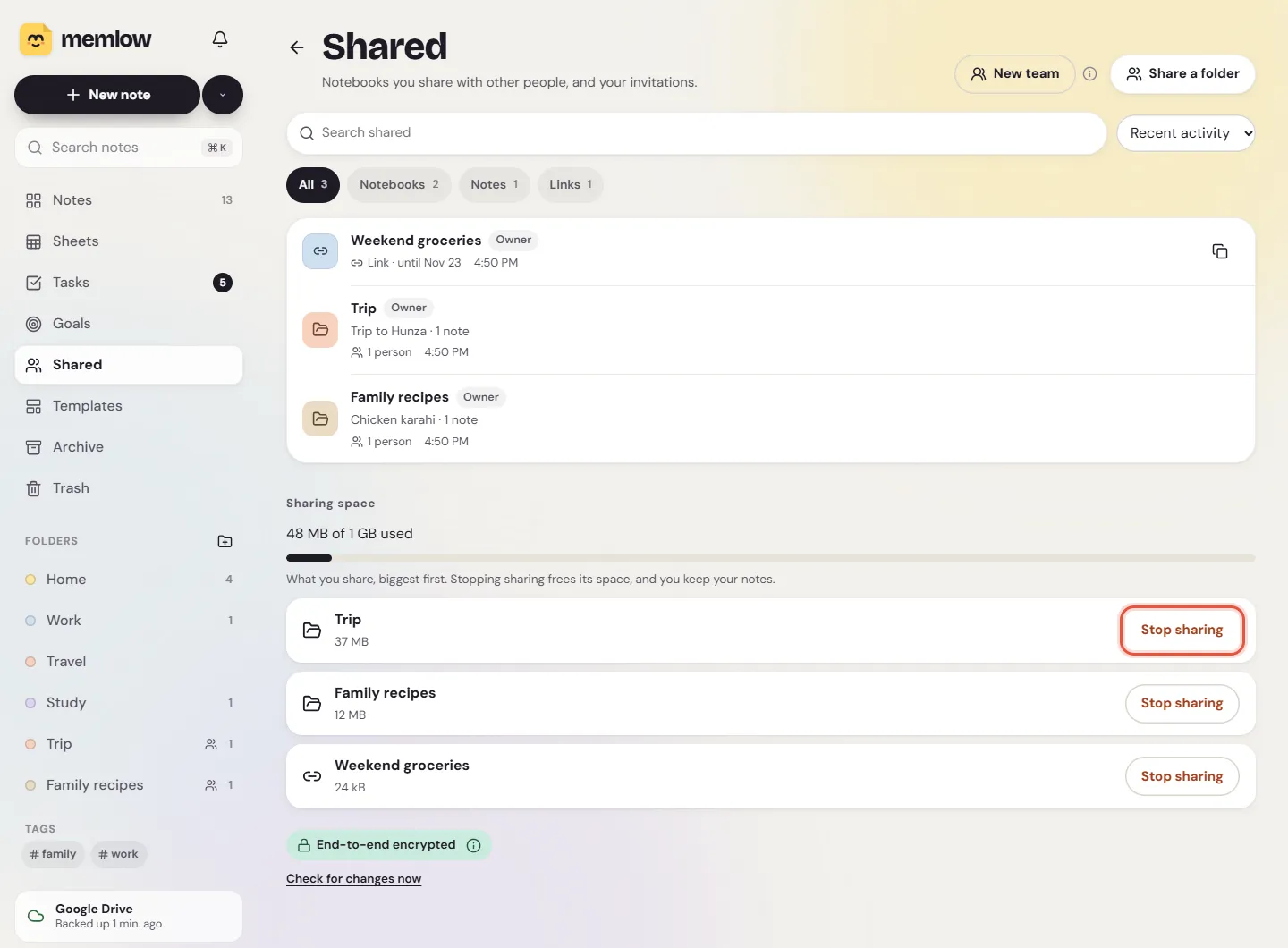
Shared(underFolderson Android and on a phone's browser, in the sidebar on a computer). - Under
Sharing space, see how much of your 1 GB you use. - Choose
Free up space. The list shows what you share, biggest first, with its size. - Choose
Stop sharingon something you don't need to share any more.
When you stop sharing, you keep the notes as your own. The people you shared with lose them. If you'd rather keep sharing a notebook, delete photos and recordings in it that nobody needs.
Your phone is almost full (Android)
When the phone has little space left, Memlow warns you on Home. Text still saves, but photos and voice notes may not. If a save fails, Memlow says "Couldn't save: your phone is full."
- Keep the note open. Memlow saves it once there's room.
- Free up space in your phone's settings, under
Storage, or delete files you don't need. - In Memlow, open
Trashand chooseEmpty trashif it holds notes with photos you don't need. This deletes them for good.
A restore also needs free space: Memlow checks first and changes nothing if there isn't enough.
Your Google Drive is full
Memlow backs up into your own Google storage, which Gmail and Google Photos share.
- Free up space in your Google account, or add more storage at Google.
- On Android,
Settings, thenGoogle Drive backup, shows how much Memlow's backups use: "Backups use" and a size. - Choose
Back up nowonce there's room.
Memlow keeps only its newest backups from each device and deletes older ones itself. For more, see Google Drive backup failed.
The browser's storage (web)
On the web, notes, photos and recordings live in the browser's storage for app.memlow.com. How much a browser allows depends on the browser and on your computer's free disk space.
- Open
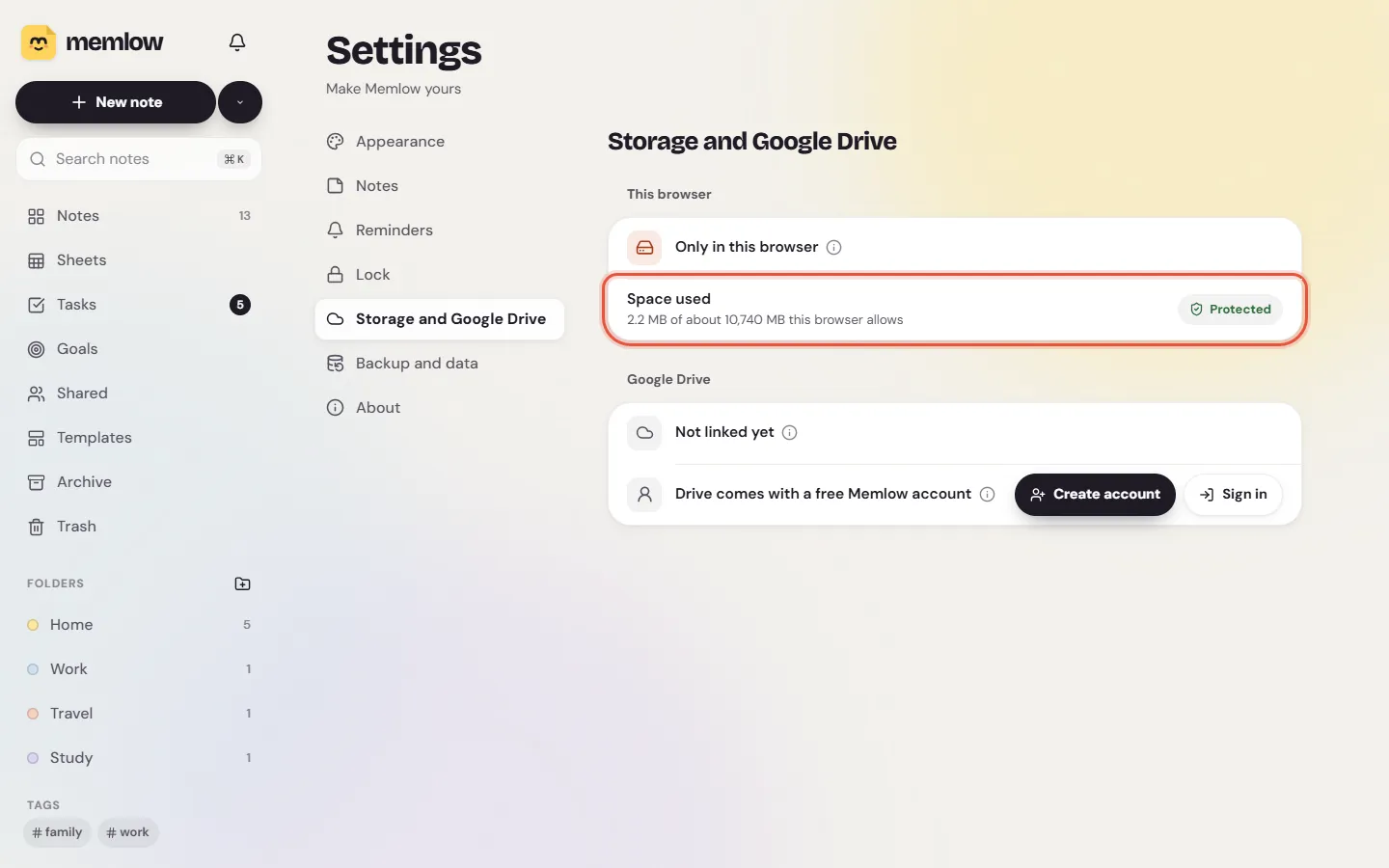
Settings, thenStorage and Google Drive. - The
Space usedrow shows how many MB Memlow uses, of about how many the browser allows. - Choose
Protect storage, so the browser keeps Memlow's data when space runs low. - If you're close to the limit, free up disk space on your computer, and empty Memlow's
Trash.
Link Google Drive too, so a full disk can never cost you your notes. See Notes kept in this browser.
Still not working?
Write to [email protected]. Please include your Memlow version (Settings, then About), your phone or browser, the exact message, and a screenshot of Sharing space or Space used. The photos article explains how photos are kept and backed up.
Questions and answers
What counts towards the 1 GB for shared notebooks?
Everything in the shared notebooks and shared notes you own: their notes, photos and recordings. Things others share with you count for them. A notebook shared with a team counts for the person who shared it.
How do I free space?
Open Shared, then Free up space. It lists what you share, biggest first. Stop sharing what you don't need: you keep the notes as your own.
What about browser storage?
On the web, Settings, Storage and Google Drive shows the space used and what the browser allows. Choose Protect storage, free disk space if you're near the limit, and link Google Drive.