
Accessibility: screen readers, text size and keyboard
Memlow is built to work with a screen reader, with large text and, on the web, with a keyboard alone. Buttons and checklist boxes have names that TalkBack and other screen readers read out. The Android app holds its layout with text at twice the normal size. On the web, menus, notes and sheets work with the keyboard, and the everyday actions have shortcuts. If something doesn't work for you, write to [email protected] and tell us what you use.
Screen readers
On Android
Memlow works with TalkBack, Android's screen reader.
- Every icon button has a name, such as "Add a reminder" or "Pin".
- A checklist item is read as a checkbox, with whether it's ticked. Double-tap to tick it.
- A note's card is read as one item: its title, then details such as its folder, whether it's pinned, its reminder and how many tasks are done.
- TalkBack's actions menu gives you what would otherwise need a drag or a long press. On a card, it holds the card's actions. In a note, each line has
Move upandMove down, andMove into toggleorMove out of togglewhere they apply. - In the Banner studio, a chosen layer has actions to move it left, right, up or down, make it bigger or smaller, and turn it.
On the web
Buttons, menus and dialogs have names and roles a screen reader can read. Menus open and close with the keyboard. A toggle says whether it's open, and a dropdown in a note opens as a list a screen reader can read, with the chosen option marked.
Charts, ratings and colours
- A chart can have a
Description for screen readers. Leave it empty and Memlow describes the chart from its data, for example each series from its lowest to its highest value. See Make a chart from your sheet. - A rating reads as a number, such as "3 of 5", not as a row of stars.
- Colour is never the only sign. A late task also says "Overdue", and a chosen chip changes its weight as well as its colour.
Make the text bigger
On Android
- Open
Settings. - Under
Look and language, tapText size. - Pick
Small,Medium,LargeorExtra large.
Memlow also follows the font size and display size you set in your phone's own settings. Screens are built to hold together with text up to 200% of the normal size, so nothing is cut off. On a narrow screen, Home shows one column of cards when two won't fit.
On the web
Open Settings, then Appearance, and move the Text size slider. For more than that, use your browser's zoom (Ctrl and + in Chrome and Edge, ⌘ and + on a Mac).
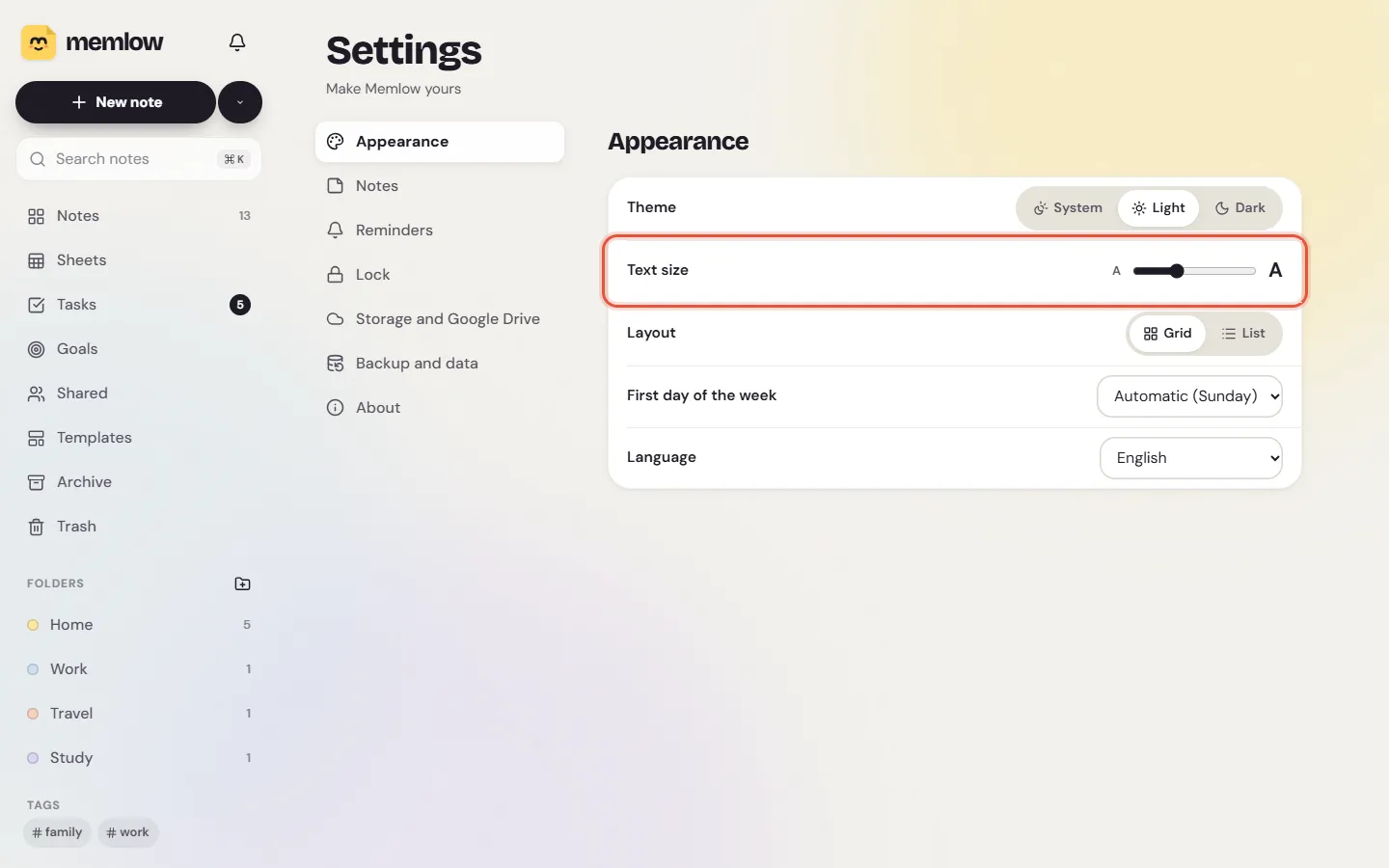
A single note can also have bigger text and more space between lines: open its Style and choose a text size and line spacing. See Themes, paper and fonts.
Dark theme and less motion
Theme in Settings has Light, Dark and System. When your phone or computer asks apps for less motion, Memlow keeps its animations to a minimum.
Use the web app by keyboard
- Press N for a new note when you aren't typing, / to search, and Ctrl + K to jump to any note, folder or action.
- Alt + ↑ and Alt + ↓ open the previous or next note in the list. Esc closes the note.
- In a note, Tab moves a line into the toggle above it and Shift + Tab moves it out.
- On a note's card, Tab reaches its
Lock note,Share…,Pinand ⋯ buttons.
The full list is in Keyboard shortcuts on the web.
In a full-screen sheet, every command is in a menu, and the menus work with the arrow keys. Alt + / opens Search the menus to find a command by name, and Ctrl + / lists the sheet's shortcuts. In the Banner studio, the arrow keys nudge the chosen layer.
Touch targets
On Android, everything you tap is at least 48 dp across, the size Android recommends. On the web, the small buttons on note cards are 44 pixels to tap.
Typing without a keyboard
Voice typing lets you speak instead of typing, using your phone's or browser's own speech recognition. Memlow has no AI of its own. See Voice notes and voice typing.
Questions and answers
Does Memlow work with TalkBack?
Yes. Buttons are named, checklist items read as checkboxes, and note cards read their title and details as one item, with actions in TalkBack's actions menu.
How do I make the text bigger in Memlow?
On Android, Settings, then Text size under Look and language. On the web, Settings, Appearance, then the Text size slider, or your browser's zoom.
Can I use the web app without a mouse?
Yes. Keyboard shortcuts cover notes, search and the command menu, and every sheet command is in a menu you can use with the keyboard.