
For students

A free notes app for students

Lecture notes, revision lists, exam reminders, a timetable and a study planner, in one free app on your phone and your laptop. Nothing to pay, and no AI writing your work for you.

  • Free
  • Private
  • No AI
  • Works offline
A lecture note in Memlow with a voice recording, key points and a to-do
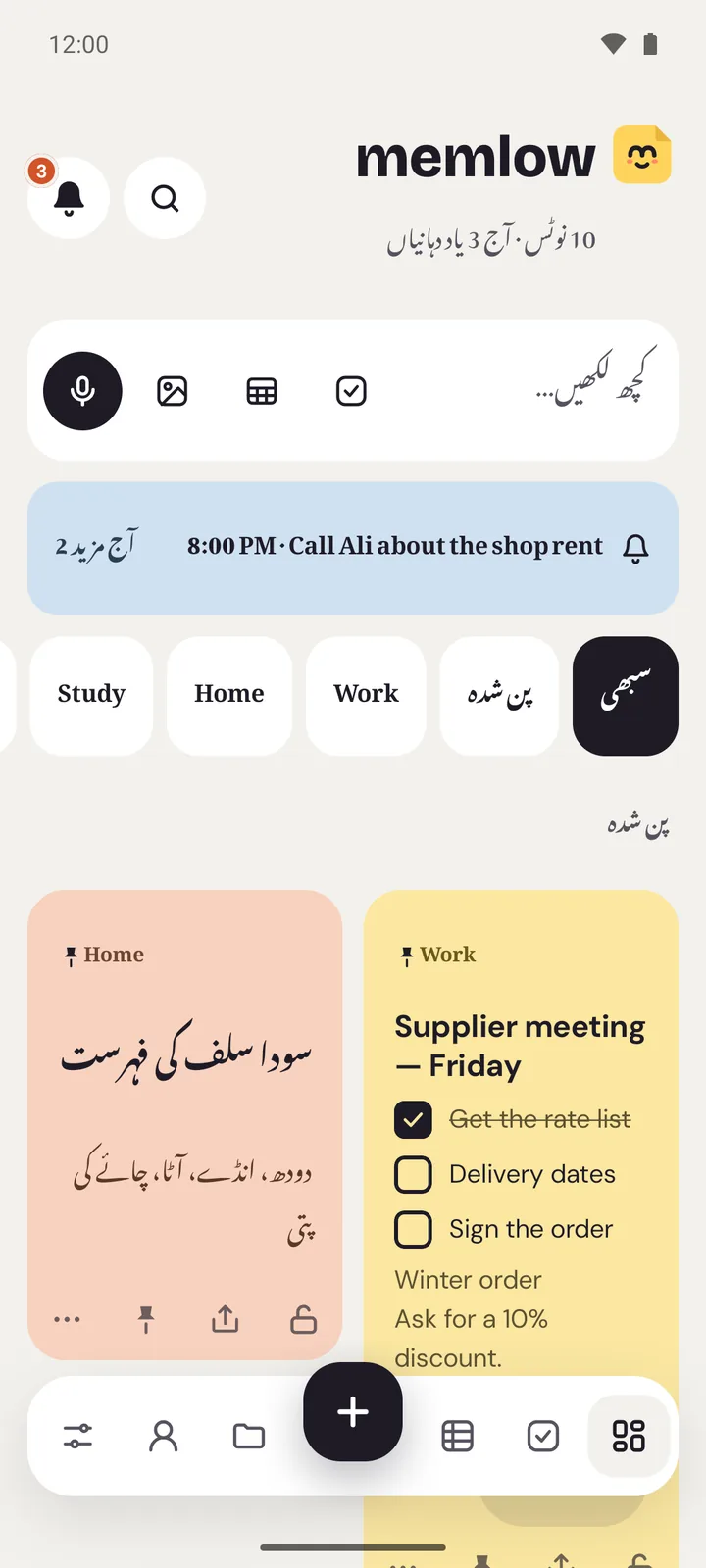
Memlow on Android in Urdu, with an Urdu checklist
  • Lecture notesTemplates for lectures, revision, assignments and books.
  • Exam remindersA reminder on each exam, and a countdown to the first.
  • Study sheetsTimetable, study planner, grades and attendance, ready to fill.
  • Study groupsShare a notebook with up to 19 classmates, encrypted.
For example

How people use it

Made-up examples, built from what the app really does.

A second-year student in LahoreLectures in English, notes in UrduAyesha opens the lecture notes template in each class, on Cornell paper. Urdu and English sit in the same note, each line in its own direction. Before exams she puts a reminder on each paper in the exam revision note.
A student sharing with a study groupOne notebook for five classmatesBilal shares a Physics folder with his group. Each person adds a chapter's summary, and toggles hide the answers under the questions, so the notebook doubles as flashcards.
A school leaver planning the termHours per subject, countedSana fills in the study planner sheet with each topic's due date and the hours she means to spend. Days left turn orange, then red, and her daily revision is a habit goal with a streak.

Take lecture notes that make sense later

The lecture notes template has the course, the date, key ideas, questions and a summary. Choose Cornell, graph or lined paper in the Style panel, or a study theme such as Exam prep, Lo-fi study or Lab notebook. Type [[ to link today's lecture to last week's, and a tag such as #physics gathers every note on the subject.

Record a lecture as a voice note of up to 30 minutes, if your teacher allows it, and play it back at 1.5× or 2×. Voice typing uses your phone's or browser's own speech recognition. There's no AI summary of anything, by design.

Never miss an exam or a deadline

Put a reminder on each item of the assignments or exam revision template. Everything with a date gathers in Tasks under Today, This week and Upcoming. A countdown element says "12 days left" until the paper, and Goals can track daily revision as a habit with a streak. More on the daily planner page.

Timetable, study planner and grades in sheets

Four sheet templates are made for school and college: a weekly timetable, a study planner with days left and hours done, a grade calculator with averages and a chart, and an attendance sheet that works out your rate. They open in Memlow Sheets, with 108 functions, on your phone and in your browser.

Study together

Share a folder as a notebook with up to 19 people, as Can edit or Can view. Changes arrive within about a second, and everything is encrypted end to end. A class society can make a team instead and share several notebooks at once. Sharing needs a free Memlow account with Google Drive backup turned on.

Free, on a cheap phone and a shared laptop

Memlow is free, and the web app has no ads, so it suits a library or lab computer: open app.memlow.com and write. The Android app runs on Android 8.0 or newer and works with no connection. Lock personal notes with a PIN if you share a phone with siblings. Back up to your own Google Drive, encrypted, so a lost phone doesn't take your notes with it.

Privacy, in plain words

Your notes stay yours.

No adjectives, just how it works. Memlow's servers never receive your personal notes, so there is nothing of yours for us to read, sell or lose. What you share is stored there encrypted end to end, so only the people you share with can read it.

Read the privacy policy

Where notes live
On your device: the phone's storage, or your browser's own storage on the web.
Accounts
A Memlow account never holds your notes. It keeps only your name, email and how you sign in.
Backups
Optional, in your own Google Drive or a file, encrypted on your device with your password (AES-256-GCM) before they leave it.
Who can read them
Only you. Not Google, not us. That also means we can't recover a lost backup password.
Analytics and AI
The apps have no analytics. This website uses Google Analytics only if you accept it. No AI reads your notes, and the Android app's few ads never see them.
Questions

Good to know

Something else? Look in the Help Center or write to [email protected].

Is Memlow free for students?

Yes, for everyone. There's no student plan because there's no paid plan. The web app has no ads; the Android app shows a few, never while you write.

Does Memlow have AI to summarise my notes?

No. There's no AI in Memlow. It won't summarise, rewrite or answer questions about your notes.

Can I write in Urdu or Hindi?

Yes. Urdu shows in Nastaliq, the app turns right to left in Urdu, and Hindi and English mix freely in one note.

Can I use it on a college computer?

Yes, in the browser at app.memlow.com. Notes are kept in that browser, so on a shared computer link your Google Drive and sign out when you're done.

Your notes stay yours.

Memlow is free and private, with no AI. Start writing in your browser, or get the Android app.

Memlow's notes: colourful cards with checklists, reminders and folders
