
Sort notes and show them as a grid or a list
You can sort notes in Memlow by Last edited, Date created, Title or Colour, and show them as a Grid of cards or a List. On the web, both are buttons at the top of Notes. In the Android app, they're in Settings. Pinned notes always stay at the top, whatever the order.
Sort your notes
| Order | What comes first |
|---|---|
Last edited | The note you changed most recently. This is the order Memlow starts with. |
Date created | The newest note |
Title | Notes in alphabetical order of their titles |
Colour | Notes grouped by their colour |
On Android
- Tap
Settingsin the bar along the bottom. - Under
Notes, tapSort notes by. - Pick an order.
On the web
- Open
Notes. - Choose the sort button (
Sort notes) at the end of the row at the top, next to the grid and list buttons. - Pick an order. A tick shows the one in use.
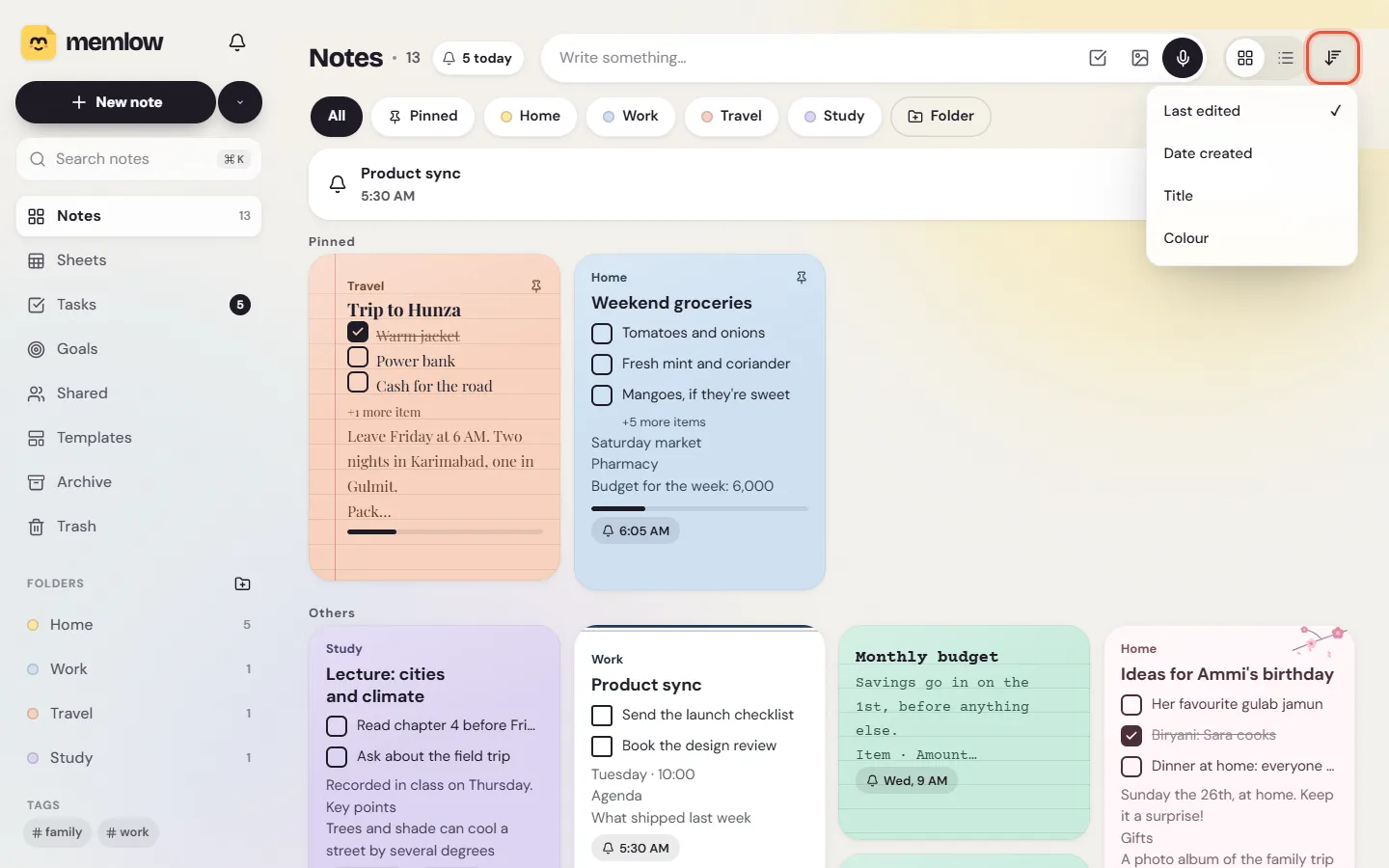
The order applies to Notes, your folders and tag views. Pinned notes sit in their own group above the rest, sorted the same way.
Grid or list
A grid shows cards side by side, with more of each note: the first checklist items, a photo, the colour. A list shows one note per row, so more fit on the screen.
On Android
Open Settings and, under Notes, tap Note layout, then Grid or List. In the list, you can swipe a card sideways to archive the note.
On the web
Use the two buttons at the top of Notes, Show as a grid and Show as a list. The same choice is under Settings, then Appearance, Layout.
The buttons on each card
Each note's card has a row of small buttons along its bottom: Lock note, Share…, Pin and ⋯ (More). They let you act on a note without opening it. On a phone they're always there. On a computer they show when you point at the card, or move to it with the Tab key.
Lock notelocks it with your PIN, or unlocks it. See Lock notes with a PIN.Share…opens sharing for that note.Pinkeeps it at the top. Tap it again to unpin.
On the web, ⋯ has the rest: Select, the note's colour, Move to folder, Copy all text, Make a copy, Export, Note info, Archive and Move to Trash. On a locked note, the ones that would show its words are greyed out. See Note info and copies of a note.
To work on several notes at once, select them first. See Folders, tags, pins and archive.
The notes list beside a note (web)
On a wide screen, the web app keeps your notes list on the left while a note is open, so you can move from one to the next.
- Type in
Filter these notes, at the top of that list, to narrow it to notes with those words. It filters only the list you're in, such as one folder. - Press Alt + ↑ or Alt + ↓ to open the previous or next note in the list.
- To give the note the whole width, choose
Hide the notes list.Show the notes listbrings it back.
On a phone, or a narrow window, a note fills the screen and the back arrow takes you to the list.
Questions and answers
How do I sort my notes by title?
On the web, choose the Sort notes button at the top of Notes and pick Title. On Android, open Settings, then Sort notes by under Notes, and pick Title.
How do I switch from grid to list?
On the web, use the grid and list buttons at the top of Notes. On Android, open Settings, then Note layout under Notes.
Why do some notes stay at the top?
They're pinned. Pinned notes stay above the rest in any order. Tap Pin on the card again to unpin one.