
Lock notes and folders with a PIN
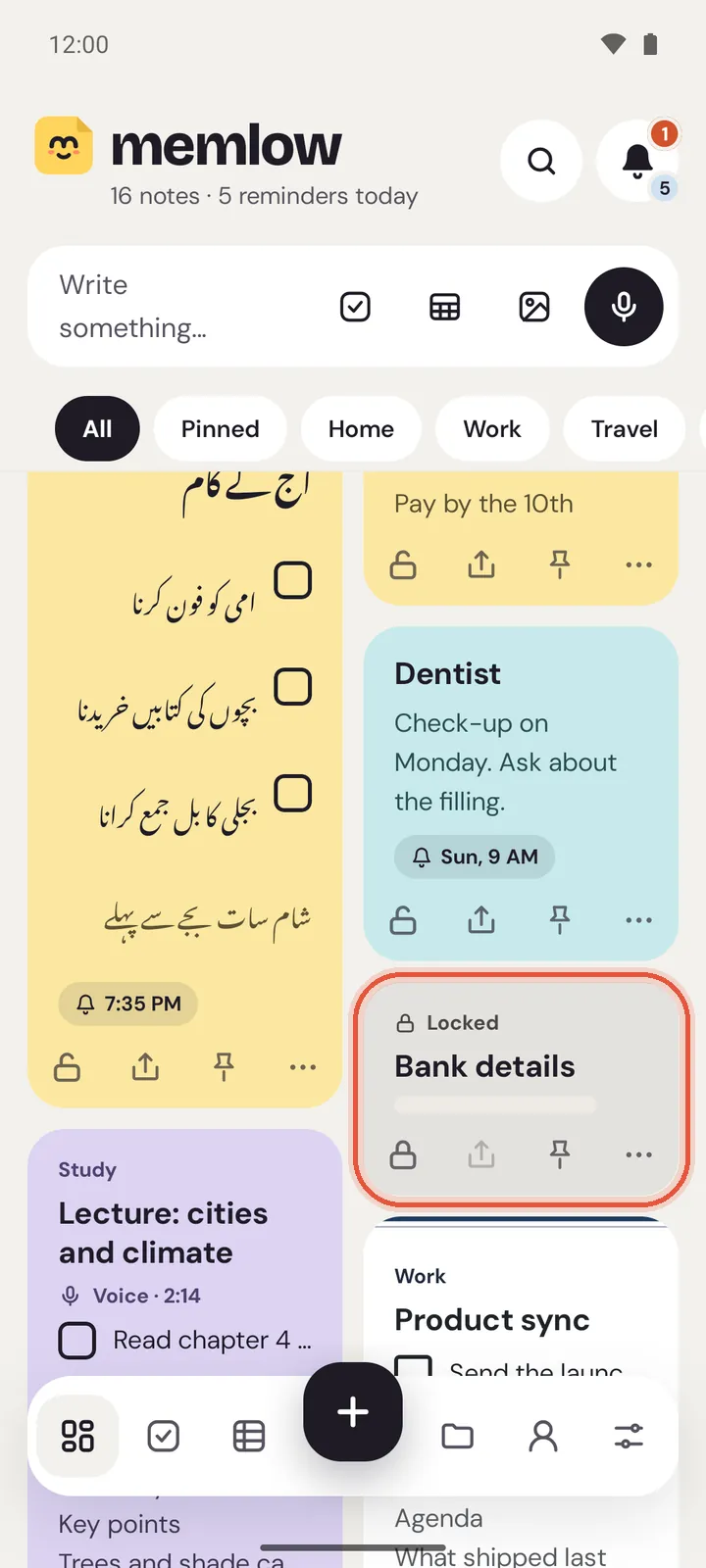
To lock notes with a PIN in Memlow, open the note and tap the lock at the top. The first time, Memlow asks you to choose a PIN. After that the note shows only its title in your lists, and opening it asks for the PIN (or your fingerprint on Android). On Android you can lock a whole folder too.
A lock is an access lock. It keeps people who pick up your phone or use your computer from reading the note. The note itself is stored on your device like any other, with no extra encryption. What is encrypted, and when, is in Where your notes live and what's encrypted.
Lock a note
On Android
- Open the note. If the keyboard is up, close it.
- Tap the lock in the top bar (
Lock note). - The first time, choose a PIN of 4 to 6 digits under
Create a PIN, tapContinue, then enter it again. - Memlow says "Note locked".
You can also lock a note from its card: the lock is the first of the small buttons at the bottom of the card.
On the web
- Open the note.
- Choose the lock in the top bar (
Lock note). - The first time, choose a PIN of 4 to 8 digits under
Choose a PIN, then enter it again.
On the web, the lock is also among the buttons on a note's card. They show when you point at the card, and are always there on a touch screen.
Tip
Choose a PIN nobody can guess from your birthday or phone number, and keep a backup. A PIN can't be recovered, but you can set a new one: see Forgot your PIN?.
Lock a folder
This is on Android only.
- Open
Folders. - Touch and hold the folder.
- Tap
Lock folder.
The folder then says "Locked folder", and every note in it is treated as locked. Opening the folder asks for the PIN once; the notes inside then open without asking again.
The web app can't lock folders. A folder you lock on your phone isn't locked on the web: its notes open there without a PIN. To keep a note locked everywhere, lock the note itself.
Open a locked note
Tap the note. Memlow asks "This note is locked" and waits for your PIN. On Android, your fingerprint works too if you turned it on.
The PIN opens that note only, and it stays open until you leave it. It works the same on Android and on the web:
- Leaving the note (going back, opening another note or a list) locks it again. Each time you open it after that, Memlow asks for the PIN.
- Each locked note asks for itself. Opening one doesn't open the others.
- Memlow going to the background locks it too: on Android, switching to another app; on the web, switching to another tab, minimising the window or reloading the page.
- Unlocking the app (with app lock) doesn't open locked notes.
- A note you lock while it's open stays open until you leave it.
Remove the lock
Open the note and tap the lock again (Unlock note on Android, Remove lock on the web). The note is then like any other. The same button on the card unlocks it too, after asking for the PIN.
What a lock hides
While a note is locked:
- Its card shows its title and "Locked". The words, checklist and photos are hidden.
- Search finds it by its title only, never by its words.
- Tasks lists its reminders as "Locked note", and a reminder on it rings as "You have a reminder" (Android) or "Memlow reminder" (web), with no note text.
- It can't go on a home-screen widget, be shared, be saved as a template, or (on the web) be duplicated.
- Saving a backup file without a password asks for your PIN first, on Android and on the web. On Android, exporting all notes does too; on the web,
Export all notesleaves locked notes out.
A shared note can't be locked, because everyone in a shared notebook needs to read it. Memlow asks you to unlock a note before you move it into a shared notebook.
What a lock doesn't do
- It doesn't encrypt the note on your phone or in your browser.
- It doesn't travel as a PIN. Locked notes stay locked in your backups and on your other devices, but each phone or browser has its own PIN. On a new phone, Memlow asks you to "Set your PIN again" before it opens your locked notes.
- So anyone who can open your backups can, on a device of their own, set a PIN and read your locked notes. On the web, your backup password or your Memlow account password also lets someone set a new PIN in a browser that has them. Keep both to yourself; see how your backup password works.
On the web, a note locked on your phone opens in a browser that never had a PIN with Set a PIN instead of the PIN pad. Choose it, show it's you with your backup password or your Memlow account, and choose a PIN for this browser. Nothing is deleted. See Forgot your PIN?.
Lock the whole app
To ask for the PIN every time Memlow opens, turn on app lock. See Lock the whole app with your fingerprint.
Questions and answers
How do I lock a note or folder?
Open the note and tap the lock in its top bar; the first time, choose a PIN. On Android, lock a folder by touching and holding it in Folders, then Lock folder.
What does a lock hide?
The note's words, checklist and photos everywhere in Memlow: lists, search, Tasks, widgets and notifications. Only its title shows.
Is a locked note encrypted?
No. A lock is an access lock: the note needs your PIN or fingerprint to open, but it's stored on your device like any other note. Your Google Drive backups are encrypted with your backup password, locked notes included.
Can I use my fingerprint?
On Android, yes, once you turn on Unlock with fingerprint in Settings, under Security. The web app uses the PIN only.