
For families

A free family organiser for lists, bills and plans

One shared notebook for the house: the grocery list, the week's meals, who paid for what, Ammi's medicine times and the savings for Eid. Everyone adds from their own phone.

  • Free
  • Private
  • No AI
  • Works offline
A weekend groceries list in Memlow, the kind a family shares, with ticked items
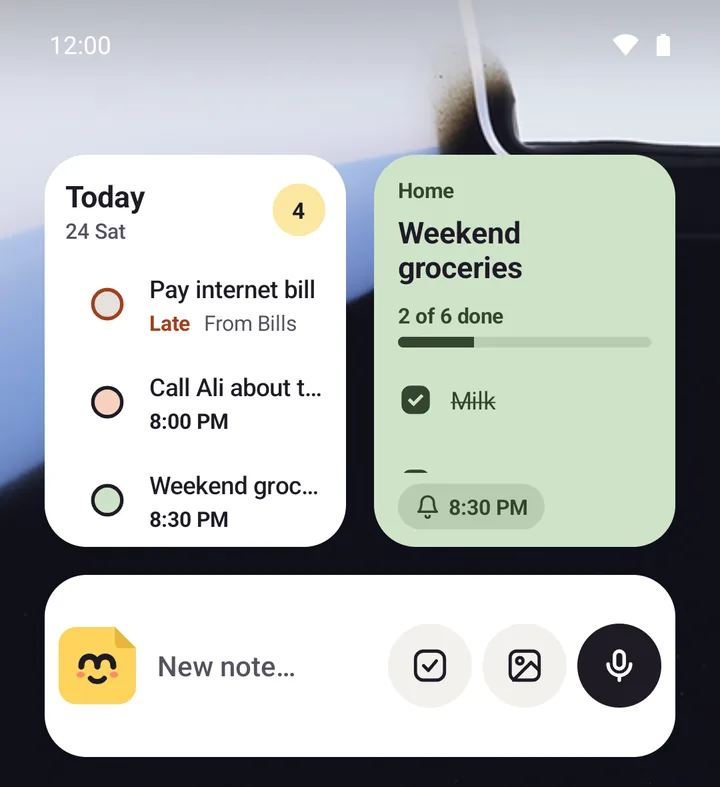
Memlow's widgets on an Android home screen: today's tasks and the groceries checklist
  • Shared listsGroceries and chores that everyone ticks off.
  • Who paid whatShared expenses and a split bills sheet.
  • RemindersMedicine, bills and school fees, ringing on time.
  • Family goalsSave for Eid or a trip; everyone logs.
For example

How people use it

Made-up examples, built from what the app really does.

A family of five in RawalpindiOne grocery list, three shoppersWhoever notices the milk is low adds it. Whoever passes the shop ticks it off. The list is in a shared notebook, so the change shows on every phone within about a second.
Caring for a parentMedicine times that ringThe medicine schedule template has morning, afternoon and night. Each dose has a repeating reminder, and the note is shared with a brother in another city.
HousematesBills split fairlyThe split bills sheet adds up what each person paid and shows who owes whom, so the end-of-month conversation takes a minute.

One notebook for the house

Make a folder called Home, share it as a notebook, and invite the family by email or @username, as Can edit or Can view. A notebook can be shared with up to 19 people. Inside go the shopping list, the meal plan, the cleaning checklist and anything else the house needs. See the grocery list app page.

Money: shared expenses and bills

The Shared expenses template is a table of who paid, what for and how much, with the total added up; it's offered in shared folders. For a trip or a flat, the split bills sheet works out each person's share and balance. A bills to pay checklist with reminders keeps the electricity and gas from going late.

Reminders for the people you look after

Put a repeating reminder on each dose in the medicine schedule, or on school fees each month. On Android, reminders ring with the app closed. If the phone is shared, turn on Hide note text in notifications, and reminders just say "Memlow reminder".

A goal the whole family saves towards

Put a goal in the family notebook, such as Rs 80,000 for Eid shopping, and anyone can add a deposit. The history shows who added what, and the ring says whether you're on track for the date. See goals.

Private, even when shared

Shared notebooks are end to end encrypted: Memlow's servers pass them along without being able to read them. Sharing needs a free Memlow account with Google Drive backup turned on. Personal notes stay out of the shared notebook, and you can lock them with a PIN on a phone the children borrow.


Privacy, in plain words

Your notes stay yours.

No adjectives, just how it works. Memlow's servers never receive your personal notes, so there is nothing of yours for us to read, sell or lose. What you share is stored there encrypted end to end, so only the people you share with can read it.

Read the privacy policy

Where notes live
On your device: the phone's storage, or your browser's own storage on the web.
Accounts
A Memlow account never holds your notes. It keeps only your name, email and how you sign in.
Backups
Optional, in your own Google Drive or a file, encrypted on your device with your password (AES-256-GCM) before they leave it.
Who can read them
Only you. Not Google, not us. That also means we can't recover a lost backup password.
Analytics and AI
The apps have no analytics. This website uses Google Analytics only if you accept it. No AI reads your notes, and the Android app's few ads never see them.
Questions

Good to know

Something else? Look in the Help Center or write to [email protected].

How many family members can share a notebook?

A notebook can be shared with up to 19 people. For more, or many notebooks, make a team of up to 50.

Do family members need the app?

They need Memlow on Android or the web app, and a free Memlow account to join a shared notebook. A single note shared with a link can be read in a browser without an account.

Is it free?

Yes. There's no paid plan. The Android app shows a few ads; the web app has none.

Can the children see my private notes?

Only what's in the shared notebook is shared. Lock your own notes with a PIN, or lock the whole app, on a phone others use.

Your notes stay yours.

Memlow is free and private, with no AI. Start writing in your browser, or get the Android app.

Memlow's notes: colourful cards with checklists, reminders and folders