
Grocery list app

A grocery list app you can share with your family

One list for the whole house. Anyone can add milk when it runs out, and whoever is at the shop ticks it off, even with no signal in the basement aisle.

  • Free
  • Private
  • No AI
  • Works offline
A weekend groceries list in Memlow with ticked items and a reminder on one item
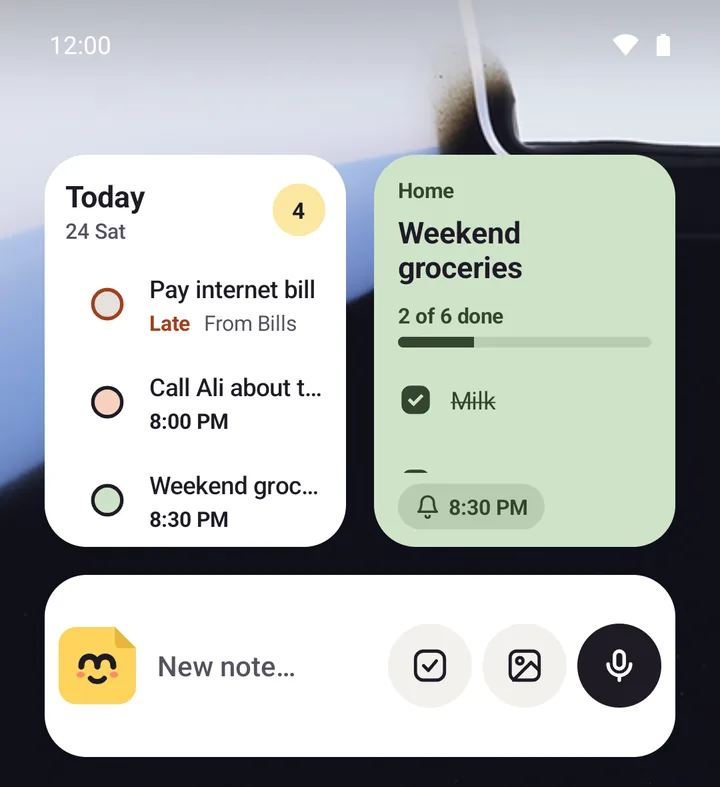
Memlow's widgets on an Android home screen: today's tasks and the groceries checklist
  • Grouped by aisleThe shopping list template starts with fruit and veg, dairy, bread and household.
  • Shared with familyEveryone adds and ticks the same list. Changes arrive within about a second.
  • Works with no signalThe list is saved on your phone, so the shop's basement doesn't matter.
  • On the home screenOn Android, the Note widget keeps the list in sight. Tick items from there.
How it works

Three steps, then it's yours

  1. Start the listUse the shopping list template, grouped by aisle.
  2. Share itInvite your family to the folder it's in.
  3. Tick as you shopTicked items drop to the bottom, signal or not.

Make a grocery list in a minute

Start from the shopping list template, or open a blank note and type [ ] and a space before each item. Press Enter for the next one. Anything you need every week can stay in the list: untick it instead of typing it again.

Turn on Move ticked items to the bottom in Settings, and what's still to buy stays at the top while you walk round. Planning meals first? The meal plan template ends with a To buy checklist.

Share it with your family

Put the list in a folder, choose Share, and invite your family by email or @username. They can add things from their own phones, and you see each change within about a second. If two people type at once, both keep their words. The list is encrypted end to end, so Memlow's servers can't read what's on it.

A notebook can be shared with up to 19 people. Sharing needs a free Memlow account with Google Drive backup turned on. You can also send one list with a link that works for 1, 7 or 30 days; people can read it in a browser without an account. More on the shared notes page.

Works in a shop with no signal

Your list lives on your phone, so it opens and ticks with no connection at all. Anything you change catches up with the rest of the family when the phone is back online. On a computer, the web app works offline too after your first visit.

Group items by aisle

The shopping list template has a heading for each part of the shop: fruit and vegetables, dairy and eggs, bread and grains, and household. Add your own headings for the butcher, the pharmacy or the bazaar. A heading folds away, so you can close the sections you've finished.

  • Put a reminder on one item, such as "bread on the way home", and it rings at that time.
  • Add a photo of the brand you want, or a voice note of what the recipe needs.
  • On Android, the Note widget shows the whole list on your home screen, ticked right there.

Free, with no AI

Memlow is free. The web app has no ads; the Android app shows a few, never while you write. Nothing reads your list or suggests products. There's no iPhone app. Family members on iPhones could try the web app in a browser, but we haven't tested it in Safari on an iPhone, so we can't promise it works well there.

Privacy, in plain words

Your notes stay yours.

No adjectives, just how it works. Memlow's servers never receive your personal notes, so there is nothing of yours for us to read, sell or lose. What you share is stored there encrypted end to end, so only the people you share with can read it.

Read the privacy policy

Where notes live
On your device: the phone's storage, or your browser's own storage on the web.
Accounts
A Memlow account never holds your notes. It keeps only your name, email and how you sign in.
Backups
Optional, in your own Google Drive or a file, encrypted on your device with your password (AES-256-GCM) before they leave it.
Who can read them
Only you. Not Google, not us. That also means we can't recover a lost backup password.
Analytics and AI
The apps have no analytics. This website uses Google Analytics only if you accept it. No AI reads your notes, and the Android app's few ads never see them.
Questions

Good to know

Something else? Look in the Help Center or write to [email protected].

Is the grocery list app free?

Yes, with no paid plan. The web app has no ads; the Android app shows a few, never in the editor.

Can my family share the same grocery list?

Yes. Share the folder as a notebook and each person adds and ticks items from their own phone. It's encrypted end to end. Sharing needs a free Memlow account with Google Drive backup on.

Does it work with no internet in the shop?

Yes. The list is saved on your phone and ticks offline. Changes reach everyone else once you're back online.

Can I put the list on my home screen?

On Android, yes: the Note widget shows one note, and you can tick its items from the widget.

Your notes stay yours.

Memlow is free and private, with no AI. Start writing in your browser, or get the Android app.

Memlow's notes: colourful cards with checklists, reminders and folders