
Android widgets

Notes, tasks and goals on your Android home screen

Five widgets, a Quick Settings tile, app shortcuts and a way to save from any app. Memlow is there before you've opened it.

  • Free
  • Private
  • No AI
  • Works offline
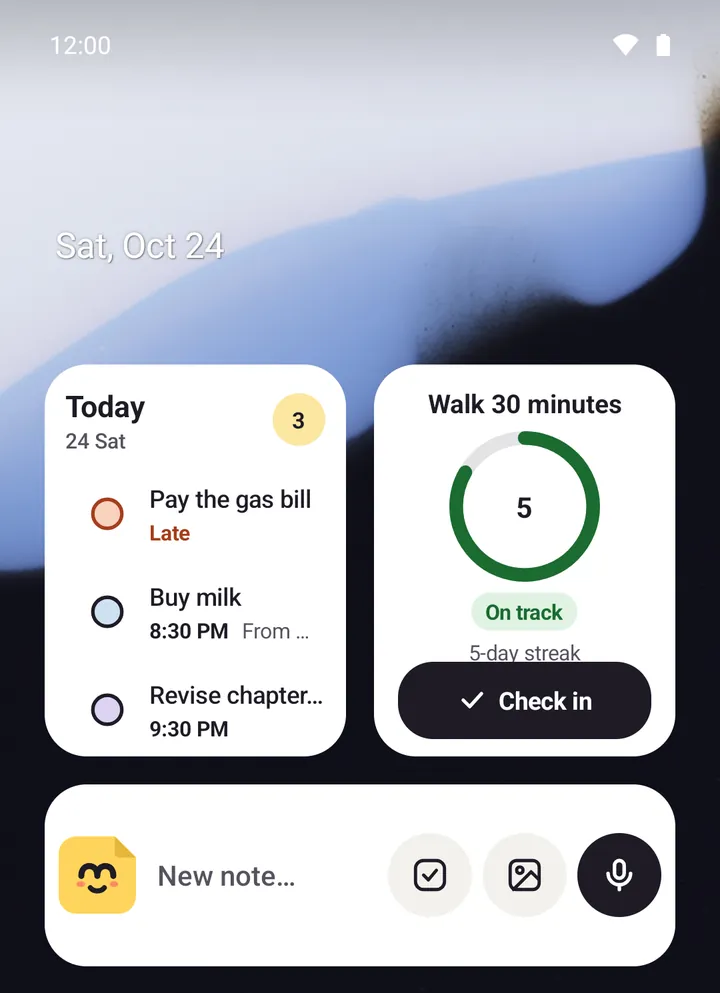
Memlow widgets on an Android home screen
  • Five widgetsQuick note, Note, Today, Goals and One goal.
  • Tick from the widgetTick a checklist or today's tasks without opening the app.
  • ShortcutsTouch and hold the icon for New note, Checklist, Voice note or Search.
  • Save to MemlowShare text or photos from any app into a new or existing note.
How it works

Three steps, then it's yours

  1. Touch and holdAn empty spot on your home screen, then Widgets.
  2. Find MemlowPick Quick note, Note, Today, Goals or One goal.
  3. Choose what it showsA note or a goal, for the widgets that ask.

The five widgets

  • Quick note: start a note or a voice note in one tap. Made wider, it adds buttons for a checklist and a photo note.
  • Note: one note on your home screen, such as the grocery list. Tick its checklist right there.
  • Today: today's tasks and reminders, late ones marked, ready to tick off.
  • Goals: up to four goals at a glance, each with how it's doing.
  • One goal: one goal's progress, with +1 or Check in from the widget.

Touch and hold an empty spot on your home screen, choose Widgets, and find Memlow. The Note and One goal widgets ask which note or goal to show, and you can change it later. These are Android only; the web app has none.

Widgets and app lock

With app lock on, the widgets say they're locked, and a tap opens Memlow, instead of showing your notes. That's as long as Hide content when locked is on in Settings. It's on unless you turn it off. Locked notes and locked goals can't be put on a widget at all, and the Today widget shows a locked note's task only as "Locked note".

Quick Settings tile and app shortcuts

Add Memlow's New note tile to the Quick Settings panel you pull down from the top of the screen. Tap it to start a note from anywhere; if the app is locked, the phone asks you to unlock first.

Touch and hold the Memlow icon for four shortcuts: New note, New checklist, New voice note and Search notes. Drag one to your home screen to keep it there.

Save to Memlow from any app

In any app that shares text or photos, choose Share, then Save to Memlow. Pick New note, with a folder if you like, or Add to a note and search for the note to add it to. Text keeps its line breaks, photos become photo blocks, and a shared subject becomes the new note's title. It's how a WhatsApp address or a screenshot of a bill ends up in the right note.

What they cost

Nothing. Widgets, the tile, the shortcuts and Save to Memlow are part of the free Android app. The app shows a few ads on its list screens to stay free; widgets show none.

Privacy, in plain words

Your notes stay yours.

No adjectives, just how it works. Memlow's servers never receive your personal notes, so there is nothing of yours for us to read, sell or lose. What you share is stored there encrypted end to end, so only the people you share with can read it.

Read the privacy policy

Where notes live
On your device: the phone's storage, or your browser's own storage on the web.
Accounts
A Memlow account never holds your notes. It keeps only your name, email and how you sign in.
Backups
Optional, in your own Google Drive or a file, encrypted on your device with your password (AES-256-GCM) before they leave it.
Who can read them
Only you. Not Google, not us. That also means we can't recover a lost backup password.
Analytics and AI
The apps have no analytics. This website uses Google Analytics only if you accept it. No AI reads your notes, and the Android app's few ads never see them.
Questions

Good to know

Something else? Look in the Help Center or write to [email protected].

Does Memlow have a to do list widget?

Yes. The Today widget lists today's tasks and reminders and lets you tick them off. The Note widget shows one whole checklist.

Is there a goals or habit widget?

Yes. Goals shows up to four goals, and One goal shows one with a +1 or Check in button.

Why does my widget say Locked?

App lock is on, and so is Hide content when locked. Turn that setting off if you want widgets to show your notes while the app is locked.

Are there widgets on the web or iPhone?

No. Widgets are in the Android app. There's no iPhone app.

Your notes stay yours.

Memlow is free and private, with no AI. Start writing in your browser, or get the Android app.

Memlow's notes: colourful cards with checklists, reminders and folders