
Public profile

A free link in bio page with your Memlow profile

Your own page at app.memlow.com/your-username: your name, a headline, a banner you design, your website and your social profiles, behind one short link and a QR code.

  • Free
  • Private
  • No AI
  • Works offline
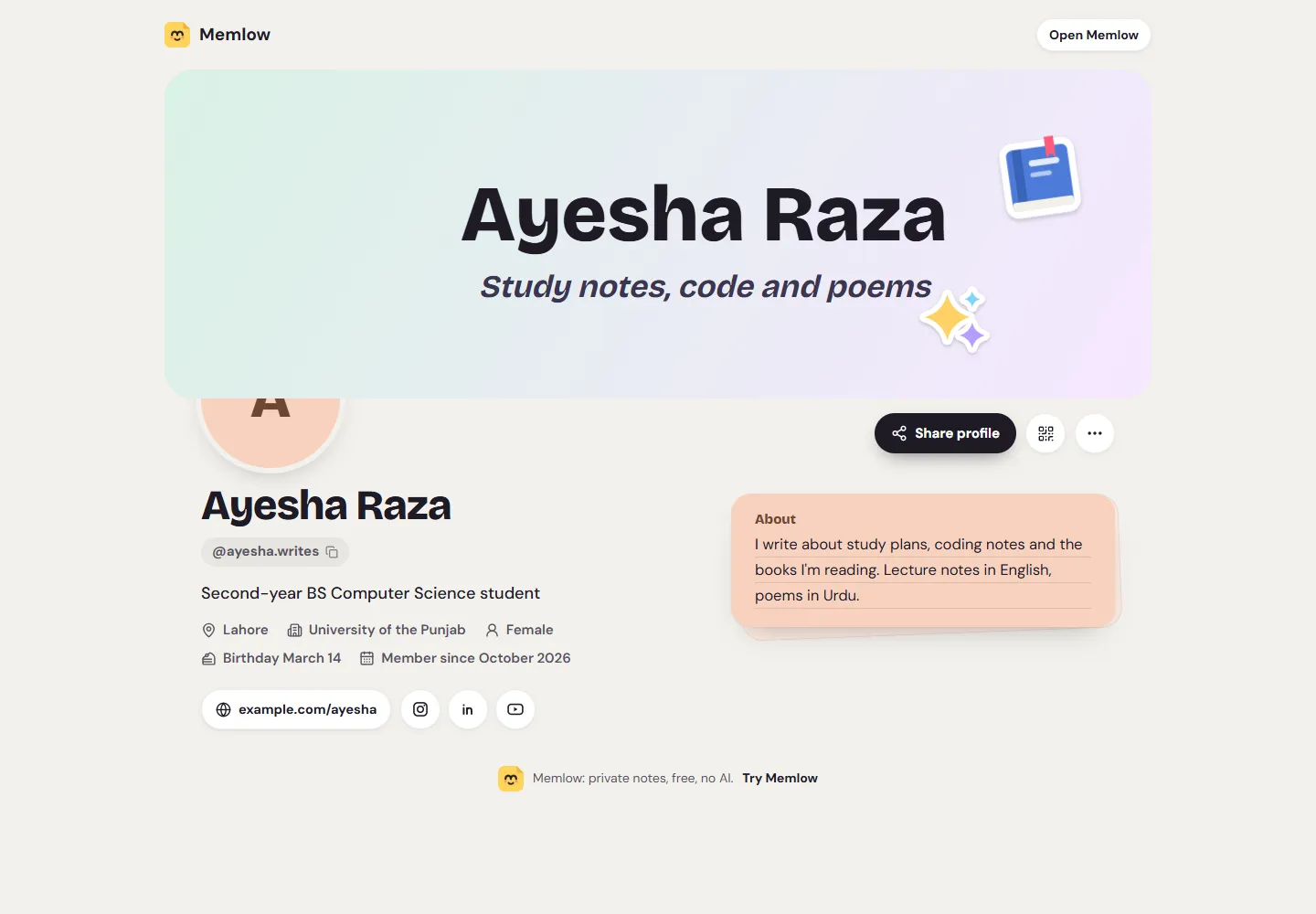
A student's public Memlow profile: a banner with her name, her headline, Lahore, her university, a birthday, her website and Instagram, LinkedIn and YouTube buttons
  • Your own addressapp.memlow.com/ and your username, chosen once.
  • Website and 7 socialsFacebook, a Facebook page, Instagram, LinkedIn, YouTube, Threads and X.
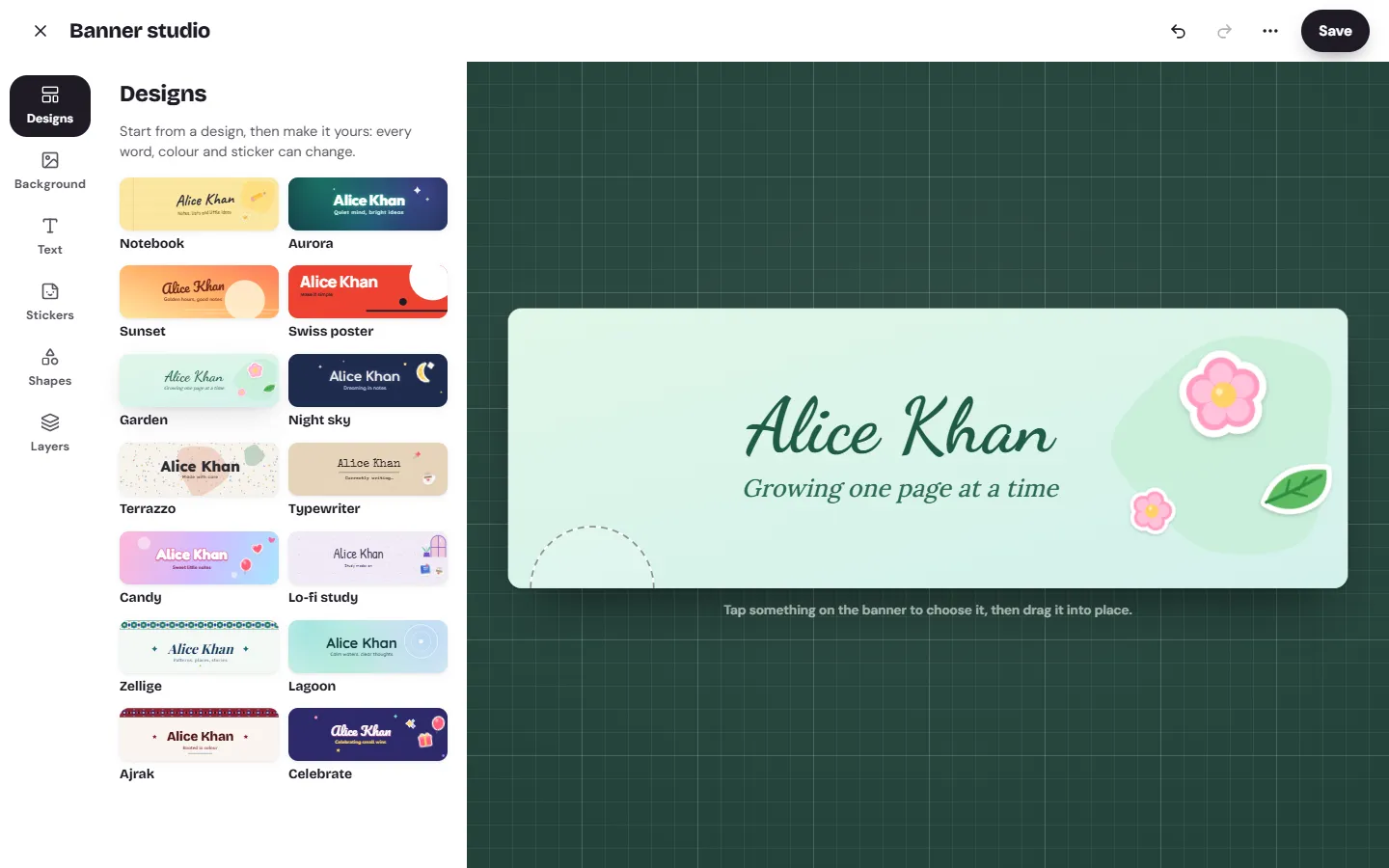
  • A banner you design14 ready-made designs to start from, or your own words and colours.
  • You choose who seesOnly me, People I share with, or Public, for every detail.
How it works

Three steps, then it's yours

  1. Choose a usernameIt becomes your page's address.
  2. Add your detailsA headline, links and a banner, each with who sees it.
  3. Share the linkCopy it, or download the QR code as a PNG.
In Memlow

Design the banner across the top of your page.

Try it now
Memlow's banner studio with the 14 ready-made designs and a banner in the Garden design

What your profile shows

Your profile is one page with the details you choose to show. That can be your name and photo, a headline of up to 80 characters, a bio of up to 300, your website, location, organization, gender and date of birth. It shows "Member since" with the month you joined. There are no posts, followers or likes. It's a page about you, not a social network.

Your notes are never part of it. Nothing you write in Memlow appears on your profile.

Add your links and a banner

Add your website and your handles on Facebook, a Facebook page, Instagram, LinkedIn, YouTube, Threads and X. Each one shows as a round button that opens your page there. Memlow checks each handle, so a pasted link to a post or a video is caught before it goes on your page.

That's the whole list: one website and seven social profiles. There's no free-form list of extra links, and no click counts or visitor statistics. If you need those, a dedicated link in bio service will suit you better.

Across the top sits a banner you design yourself in the banner studio, from one of 14 ready-made designs or from scratch.

Share your profile link

Your address is app.memlow.com/ followed by your username. Put it in your Instagram bio, your email signature or your CV. On the page, Share profile opens your phone's share sheet, Copy link copies the address, and Copy @username copies your handle so people can invite you to a shared notebook.

The QR code button shows a code that opens your page, and Download PNG saves it. A shop can print it for the counter; a student can put it on a poster for a society event.

Who can see what

Every detail, and your name and photo, has its own setting:

  • Only me: nobody else sees it.
  • People I share with: people in one of your shared notebooks or teams, and people who added a note you shared.
  • Public: anyone with your profile's address, and search engines may list the page.

Nothing is public until you choose. With nothing public, your page says it's private. Your date of birth can show as a birthday, the full date or just your age, and it's used for nothing else. Anyone can report a profile that breaks the rules, and the person reported never learns who did.

What you need

A profile needs a free Memlow account and a username. You choose the username once: 3 to 30 letters a to z, numbers, dots or underscores, and it can't be changed later. You can write notes in Memlow without an account; the profile is for when you want a page of your own. It works the same in the Android app and on the web, in every app language. Your username and profile walks through it.

Privacy, in plain words

Your notes stay yours.

No adjectives, just how it works. Memlow's servers never receive your personal notes, so there is nothing of yours for us to read, sell or lose. What you share is stored there encrypted end to end, so only the people you share with can read it.

Read the privacy policy

Where notes live
On your device: the phone's storage, or your browser's own storage on the web.
Accounts
A Memlow account never holds your notes. It keeps only your name, email and how you sign in.
Backups
Optional, in your own Google Drive or a file, encrypted on your device with your password (AES-256-GCM) before they leave it.
Who can read them
Only you. Not Google, not us. That also means we can't recover a lost backup password.
Analytics and AI
The apps have no analytics. This website uses Google Analytics only if you accept it. No AI reads your notes, and the Android app's few ads never see them.
Questions

Good to know

Something else? Look in the Help Center or write to [email protected].

Is the Memlow profile a Linktree alternative?

For a simple page, yes: your name, a banner, a bio, your website and seven social profiles behind one link and a QR code, free. It has no custom list of links and no click statistics, so it won't replace a full link in bio service for everyone.

Can people see my notes on my profile?

No. Your notes are never part of your profile. It shows only the details you mark Public.

Which social profiles can I add?

Your website, plus Facebook, a Facebook page, Instagram, LinkedIn, YouTube, Threads and X (Twitter).

Can I change my username later?

No. You choose it once, because it's your page's address and how people invite you.

Is it free?

Yes. The profile, the banner studio and the QR code are free, like everything in Memlow. It needs a free Memlow account.

Your notes stay yours.

Memlow is free and private, with no AI. Start writing in your browser, or get the Android app.

Memlow's notes: colourful cards with checklists, reminders and folders