Note themes

A beautiful notes app, with a theme for every note

A shopping list doesn't need to look like a diary. In Memlow each note can have its own theme, colour, paper and font, and every one of them is free.

  • Free
  • Private
  • No AI
  • Works offline
Memlow's Style panel beside a note in the Sakura theme
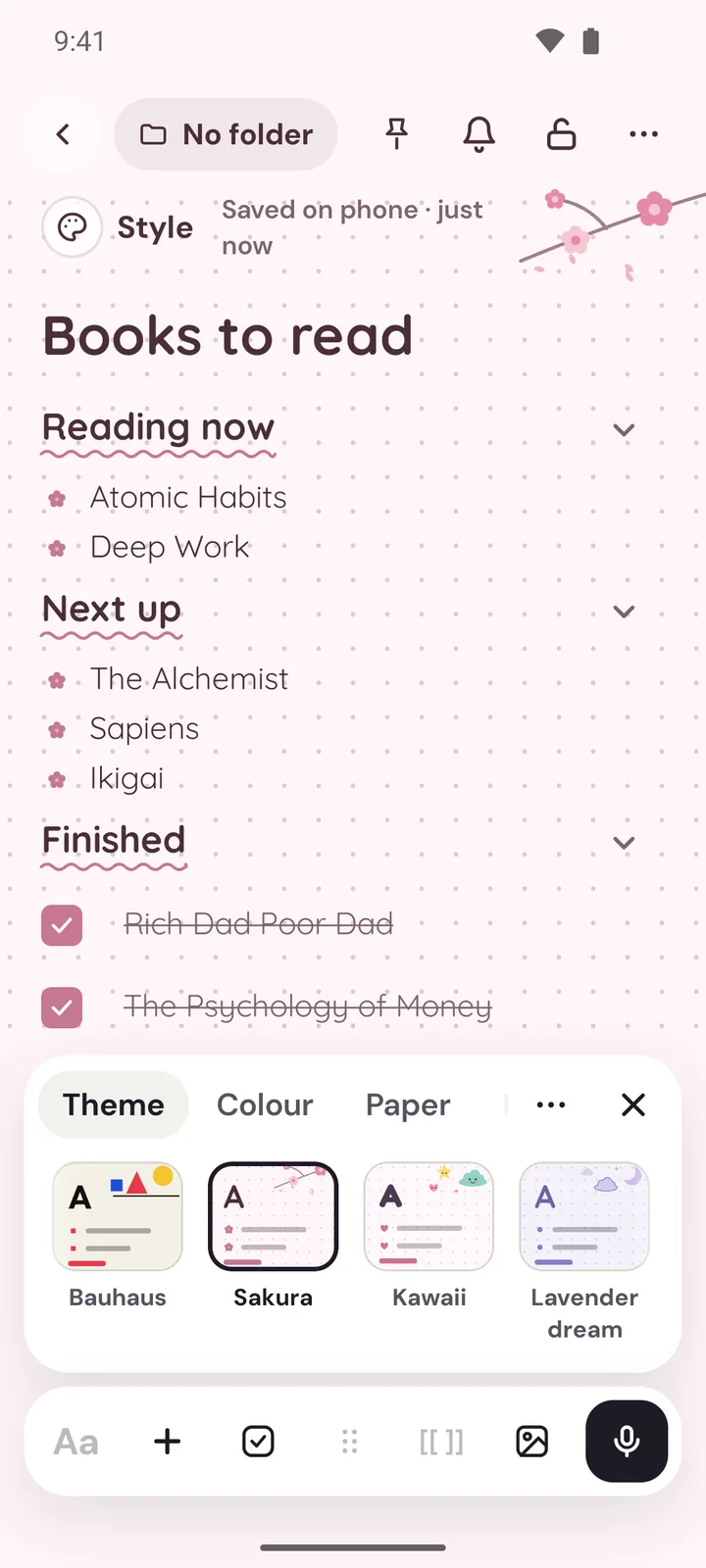
A note in the Sakura theme on Android with the theme picker open
  • 43 themesFrom calm Zen and Nordic to Sakura, Chalkboard and Truck art.
  • Real paperPlain, lined, notebook, grid or dots. Lined paper puts a rule under every line you write.
  • 30 fontsHandwriting, rounded, serif, clean, typewriter and decorative, plus fonts for other alphabets.
  • Style once, reuseGive one note a look, then make it the start for every new note.
How it works

Three steps, then it's yours

  1. Open StyleEvery note has a Style panel beside it, and changes show at once.
  2. Pick a theme43 themes change the colours, paper, art and fonts together.
  3. Make it yoursOr choose a colour, paper, decoration and font, and use it for new notes.
A few of the 43

A theme for every mood

Each theme brings its own colours, paper, art and fonts, and a night version for dark mode.

AaSakura
AaExecutive
AaZen
AaBotanical
AaMorning pages
AaCoastal
AaKawaii
AaTypewriter
AaMidnight
AaChalkboard
AaArt deco
AaTruck art

Themes that change the whole page

A theme is more than a colour. Each of Memlow's 43 note themes brings its own page colours, a little artwork, a heading style, a checkbox style and fonts, chosen to go together. They're grouped by mood, so you can find one quickly:

  • Minimal: Editorial, Zen, Nordic
  • Work & study: Executive, Legal pad, Ledger, Exercise book
  • Cute: Sakura, Kawaii, Lavender dream, Bullet journal
  • Nature: Botanical, Matcha, Monsoon, Watercolour
  • Night: Midnight, Dark academia, Celestial, Chalkboard
  • World: Arabesque, Block print, Seigaiha waves, Truck art

There are Classic and Bold themes too, such as Typewriter, Rose gold, Bauhaus and Retro 70s. A theme can bring its own paper as well: Legal pad comes on notebook paper with a drawn binding, Sakura on dots with cherry blossom, and Blueprint on a grid in a typewriter-style font.

Colour, paper and decorations

Not in the mood for a full theme? Give a note one of 12 colours, from Butter and Sage to Sky and Rose. Its card on Home takes the same colour, so you can spot it at a glance, and Search can filter notes by colour. Then pick a paper:

  • Lined puts a rule under every line of text, and the rules follow headings and wrapped lines.
  • Notebook adds a margin line, like a school exercise book.
  • Grid and Dots suit sketches, plans and bullet journals.

For a finishing touch, add a decoration to the top corner: washi tape, sparkles, flowers, bunting, a moon and stars, a folded corner and more.

Fonts with character

Choose from 30 fonts in seven groups: handwriting (Caveat, Patrick Hand), rounded (Nunito, Quicksand), serif (Lora, Playfair Display), clean (Outfit, Lexend), typewriter (Courier Prime, Special Elite), decorative (Pacifico, Dancing Script), and fonts for other alphabets, such as Vazirmatn and Noto Naskh Arabic for Arabic script. Then set the note's text size, from small to extra large, and the line spacing: compact, normal or relaxed. Writing in Urdu? It's shown in Nastaliq, as our page on Urdu notes explains.

Style once, use it again

Found a look you love? In a note's Style panel, choose Use for new notes and every new note starts the same way. Save a styled note as your own template and its colour and style come along, so a daily journal in Morning pages or a habit tracker on dotted paper looks right every time. Changed your mind? Start plain again clears it.

Easy on the eyes

Choose light mode, dark mode, or follow your device. In dark mode, note colours and most themes switch to a night version that keeps their mood without the glare, while the Night themes, such as Midnight and Chalkboard, stay dark all the time. The whole app has its own text size in Settings, too. And a beautiful notes app shouldn't cost extra: all of it is free on app.memlow.com and on Android, with no premium themes to unlock.

Privacy, in plain words

Your notes stay yours.

No adjectives, just how it works. Memlow has no server that stores notes, so there is nothing of yours for us to read, sell or lose.

Read the privacy policy

Where notes live
On your device: the phone's storage, or your browser's own storage on the web.
Accounts
A Memlow account never holds your notes. It keeps only your name, email and how you sign in.
Backups
Optional, in your own Google Drive or a file, encrypted on your device with your password (AES-256-GCM) before they leave it.
Who can read them
Only you. Not Google, not us. That also means we can't recover a lost backup password.
Visits and AI
The website counts visits without cookies or IDs, and the notes app sends nothing. No AI reads your notes. The Android app shows a few ads, which never see your notes.
Questions

Good to know

Something else? See Support or write to support@memlow.com.

How many themes does Memlow have?

43 themes, each with its own colours, art, heading and checkbox style, and fonts. There are also 12 note colours if you only want a tint.

Can I use lined paper for my notes?

Yes. Choose Lined, or Notebook for a margin line as well. The rules sit under every line of text, even headings and wrapped lines.

Are the themes free?

Yes. Every theme, font and paper is free on the web and on Android. There's no Pro version.

Can each note look different?

Yes. Style is set per note. You can also make one note's style the starting point for every new note.

Do themes work in dark mode?

Yes. Most themes switch to a night version in dark mode, and the Night themes, like Midnight and Chalkboard, are dark all the time. Memlow can also follow your device's light or dark setting.

Your notes stay yours.

Memlow is free and private, with no AI. Start writing in your browser, or get the Android app.

Memlow's notes: colourful cards with checklists, reminders and folders