


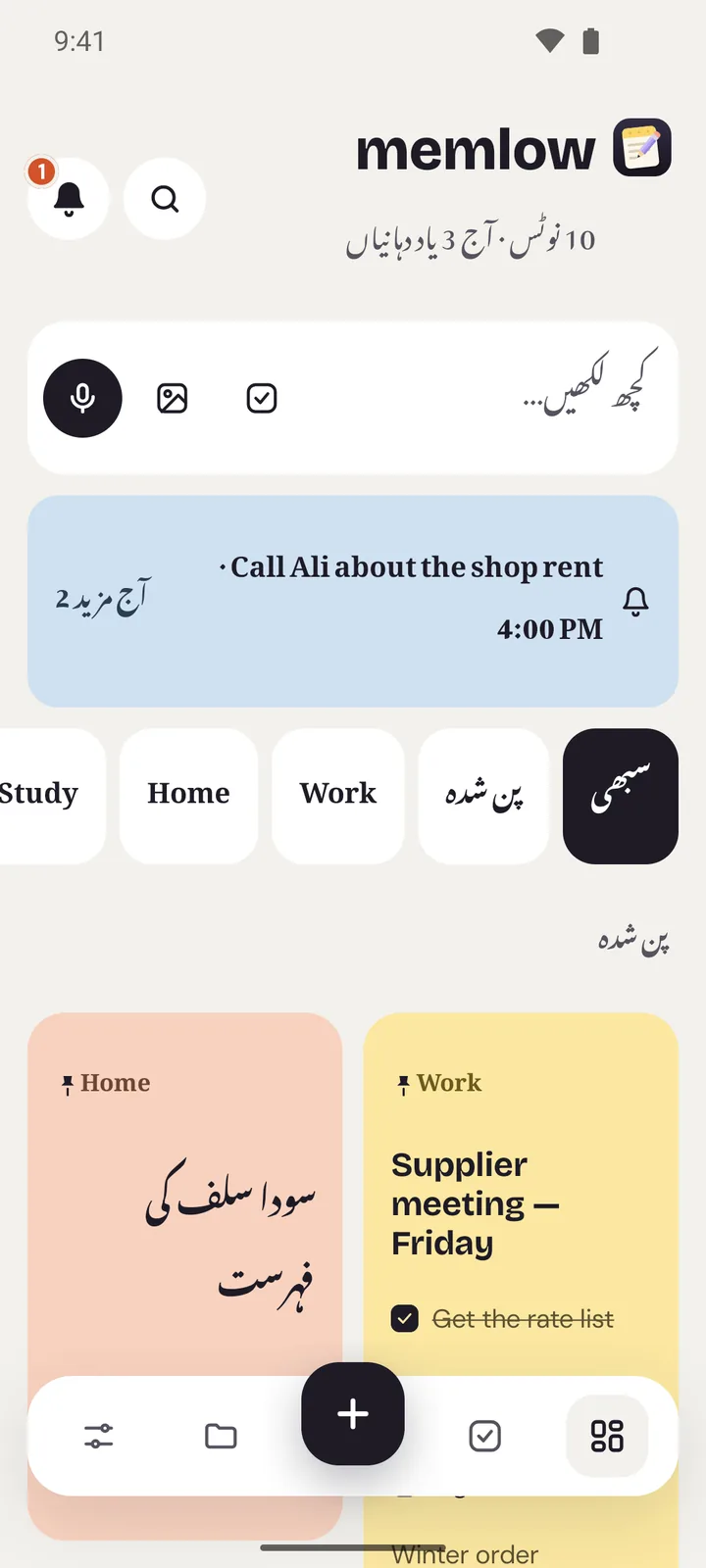
- Urdu is shown in Nastaliq, right to left, without changing anything. Naskh is there if you prefer it.
- Switch the whole app to Urdu in Settings, and it turns right to left. Your phone can stay in English.
- Each paragraph takes its own direction, so Urdu and English sit side by side in one note.
Start writing: Nastaliq comes first
Open a note and type in Urdu, with whichever keyboard you like, phonetic or standard. Memlow takes the text as it comes. You don't need to change anything first: Urdu is shown in Nastaliq, the flowing script of Urdu books and newspapers, and the lines get extra height so the letters don't crowd each other.
Memlow recognises Urdu from the letters only Urdu uses, such as ٹ and ڈ, so notes that mix Urdu with other languages work too. Urdu titles and note cards on Home are shown in Nastaliq as well. Prefer Naskh? You can choose it instead.
Use the whole app in Urdu
You can write Urdu notes whatever language the app is in. To have Memlow itself in Urdu as well, change its language:
- On the web: choose اردو in Settings.
- On Android: Memlow follows your phone's language. To use Urdu in Memlow only, open Settings → App language and choose اردو.
Every menu, button and message changes to Urdu, and the layout turns right to left: the side menu, the arrows and the lists all mirror. Because Memlow's language is set on its own, the app can be in Urdu while your phone stays in English. The web app comes in 15 languages and the Android app in 35, so Arabic, Hindi and many more are there too.
Mix Urdu and English in one note
Real notes are often mixed: a shopping list in Urdu, a meeting note in English, a recipe in both. Memlow takes the direction of each paragraph from its own text, so Urdu lines read right to left and English lines left to right, side by side in the same note.
That holds whichever language the app is in. An Urdu note reads right to left even when the app is in English, and an English note stays left to right when the app is in Urdu. English words in an Urdu line keep their own font. And you can set a paragraph's direction by hand whenever you want to.
Search and reminders that read Urdu
Search looks through every word of every note. For Urdu, it ignores the small differences that trip up most searches:
- Zer, zabar and pesh: a word is found with or without them.
- Letter forms: the different forms of ی and ک that Urdu and Arabic keyboards type.
- Digits: Urdu digits match English ones, so ۲۰ finds 20.
So a word typed on one keyboard still turns up when you search from another, and a customer's name brings up every note that mentions them.
Smart reminders read Urdu too. Write کل شام 6 بجے امی کو فون کرنا ہے (call mum at 6 tomorrow evening) and Memlow offers to set the reminder. One tap and it's set; ignore it and nothing happens. With Memlow or your phone in Urdu, Roman Urdu works as well, such as “kal subha 9 baje”.
This isn't AI. It's a fixed set of rules that runs on your device and reads 12 languages, Urdu and Arabic among them. Your words stay in the note. If you'd rather not be asked, turn off Suggest reminders in Settings. Every reminder you set gathers in Tasks, under Today, Upcoming and Done. On Android, reminders ring even when Memlow is closed. On the web, they ring while Memlow is open in a tab or installed and running.
Templates that suit Urdu notes
Each of Memlow's 40 templates becomes a normal note once you open it, so you can rename the headings and write the rest in Urdu. A few work especially well for notes kept the way you'd keep them on paper:
- Credit book: it does the same job as a paper khata, with a list of money owed to you, a list of money you owe and a Settled checklist. It holds other people's names and amounts, so lock it with a PIN. See the credit book.
- Daily sales: each day gets its own dated note, with numbered sales, the day's expenses, a total and the cash in hand. See daily sales.
- Week planner: a heading and a checklist for each day, and the days appear in the app's language, so with Memlow in Urdu they're in Urdu too. See the week planner.
Speak in Urdu
Memlow has no AI, so it doesn't turn speech into text itself. Voice typing uses the speech recognition your phone or browser already has:
- On the web, speak to type listens in the language Memlow is set to. With the app in Urdu, it listens in Urdu, where your browser's speech service supports it. Some browsers, such as Chrome, send the audio to their provider to turn it into text.
- On Android, voice typing uses your phone's own speech service. When your language isn't available offline, that service may send the audio to its provider, such as Google.
If you'd rather nothing leaves your device, record a voice note instead: recordings are made and kept on your device. Our guide to voice notes and voice typing has more.
The same on the web and on Android
Nastaliq, right-to-left notes and the whole app in Urdu come with both app.memlow.com in your browser and the Android app, free and with no AI. Your notes stay on your device either way. The two read and write the same backups, so an Urdu note written on your computer can reach your phone through your own Google Drive or a backup file. Use the same notes on your phone and computer shows how.
Want a look to match? The World themes include Arabesque, Block print and Truck art. And if you write Arabic too, everything here works for Arabic as well: right-to-left notes, the whole app in Arabic, search that ignores harakat and letter forms, and smart reminders that read Arabic dates and times. Among the 30 fonts are Vazirmatn and Noto Naskh Arabic for Arabic script. In the Android app, Persian and Hebrew are written right to left too.


