Reminders

Notes with reminders, right where you wrote them

A reminder belongs next to the thing you need to remember. In Memlow it sits in the note itself: on the whole page, or on one line of a list.

  • Free
  • Private
  • No AI
  • Works offline
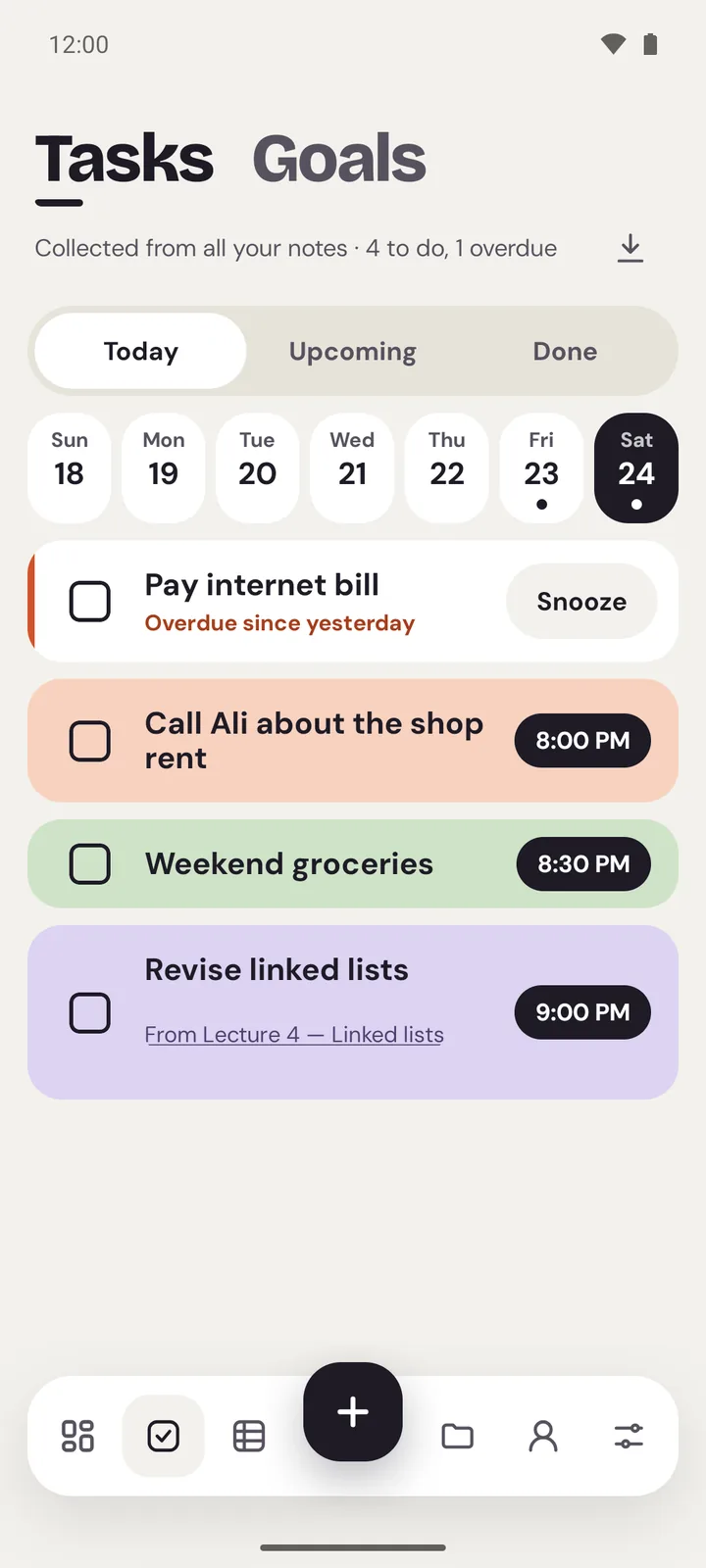
Memlow's Tasks screen: five reminders for today, each from a different note
The Tasks screen on Android with today's reminders
  • Note or itemBe reminded of a whole note, or of just one item in a checklist.
  • Repeats your wayDaily, weekly on the days you pick, monthly or yearly. Snooze when now isn't good.
  • Smart, not AIWrite “dentist Friday 5pm” and Memlow offers that reminder, using simple rules in 12 languages.
  • Today at a glanceTasks shows Today, Upcoming and Done, with anything overdue first.
How it works

Three steps, then it's yours

  1. Write it downType “call mum tomorrow at 5” and Memlow offers the reminder.
  2. Pick whenOnce, or repeating: daily, on chosen weekdays, monthly or yearly.
  3. See your dayTasks gathers every reminder under Today, Upcoming and Done.
In Memlow

A reminder can sit on a whole note or on one item of a list.

Try it now
A checklist with a reminder on one item

A reminder inside the note

Tap the bell at the top of any note to set a reminder. Pick a quick choice (in an hour, this evening, tomorrow morning or next week) or choose your own date and time. The note's card on Home shows when it's due, so you see it coming.

For lists, choose which item the reminder is about. Your “Saturday jobs” list can remind you to call the plumber at 10 without nagging you about the rest. Keeping notes with reminders in one place means the details are right there when it rings: the address, the order number, the questions you meant to ask.

Repeating reminders and snooze

Some things come round again. Set a reminder to repeat daily, weekly on the days you choose (say Monday, Wednesday and Friday), monthly or yearly. A monthly reminder on the 31st rings on the last day of shorter months, then on the 31st again when it comes. Busy when it rings? Snooze it, and it comes back a little later. A few ways to use them:

  • Bills: a bills to pay checklist, with a monthly reminder on each bill a few days before it's due.
  • Health: a daily reminder on each dose in a medicine schedule.
  • Appointments: the address, the time and your questions in one note, with the reminder on top.
  • Birthdays: a yearly reminder on a note of gift ideas, so it rings while there's still time to shop.

Smart reminders from what you write

You often type the time without thinking about it: “call mum tomorrow at 5”, “pay rent on 16 October”. Memlow notices dates and times like these and offers to set the reminder. One tap and it's set; ignore it and nothing happens.

This isn't AI. It's a fixed set of rules that runs on your device and reads 12 languages, among them English, Urdu, Arabic, Hindi, Spanish and Turkish. Your words stay in the note. If you'd rather not be asked, turn off Suggest reminders in Settings.

Tasks: Today, Upcoming, Done

Every reminder from every note gathers in Tasks. Today shows what's due by tonight, with anything overdue at the top. Upcoming looks ahead, and Done keeps what you've finished. Tick a task off there and it's ticked in its note too, so the list and the reminder never disagree. Repeating tasks are marked as repeating, and Home tells you at a glance how many reminders are due today.

Where reminders ring

On Android, reminders ring as notifications even when Memlow is closed, with Done and Snooze right in the notification, and the Today widget shows what's due on your home screen.

On app.memlow.com, a browser can only ring a reminder while Memlow is open in a tab or installed and running. One you miss waits in the bell when you come back. For reminders that must always ring, use the Android app.

Privacy, in plain words

Your notes stay yours.

No adjectives, just how it works. Memlow has no server that stores notes, so there is nothing of yours for us to read, sell or lose.

Read the privacy policy

Where notes live
On your device: the phone's storage, or your browser's own storage on the web.
Accounts
A Memlow account never holds your notes. It keeps only your name, email and how you sign in.
Backups
Optional, in your own Google Drive or a file, encrypted on your device with your password (AES-256-GCM) before they leave it.
Who can read them
Only you. Not Google, not us. That also means we can't recover a lost backup password.
Visits and AI
The website counts visits without cookies or IDs, and the notes app sends nothing. No AI reads your notes. The Android app shows a few ads, which never see your notes.
Questions

Good to know

Something else? See Support or write to support@memlow.com.

Can I get reminders from notes in my browser?

Yes. Allow notifications when Memlow asks. On the web, reminders ring while Memlow is open in a tab or installed as an app, and missed ones show in the bell.

Do reminders work offline?

Yes. Reminders are kept on your device, so they don't need internet. On Android they ring even when the app is closed.

Can a reminder repeat on certain days of the week?

Yes. Choose Weekly and pick the days you want, such as Monday and Thursday.

How do smart reminders work?

When you write a date or time, like “tomorrow at 5”, Memlow offers to set a reminder. It uses simple rules in 12 languages, not AI, and nothing leaves your device.

Why didn't my reminder ring on Android?

Usually a phone setting is in the way. Allow notifications and Alarms and reminders for Memlow, and set its battery use to Unrestricted. The Support page has the details.

Your notes stay yours.

Memlow is free and private, with no AI. Start writing in your browser, or get the Android app.

Memlow's notes: colourful cards with checklists, reminders and folders