Phone and computer

Notes on phone and computer, through your own Google Drive

Write on your laptop, read it on your phone. Memlow on the web and the Android app use the same encrypted backups in your Google Drive, so your notes can move between them.

  • Free
  • Private
  • No AI
  • Works offline
Memlow on the web: notes in a grid with folders and reminders
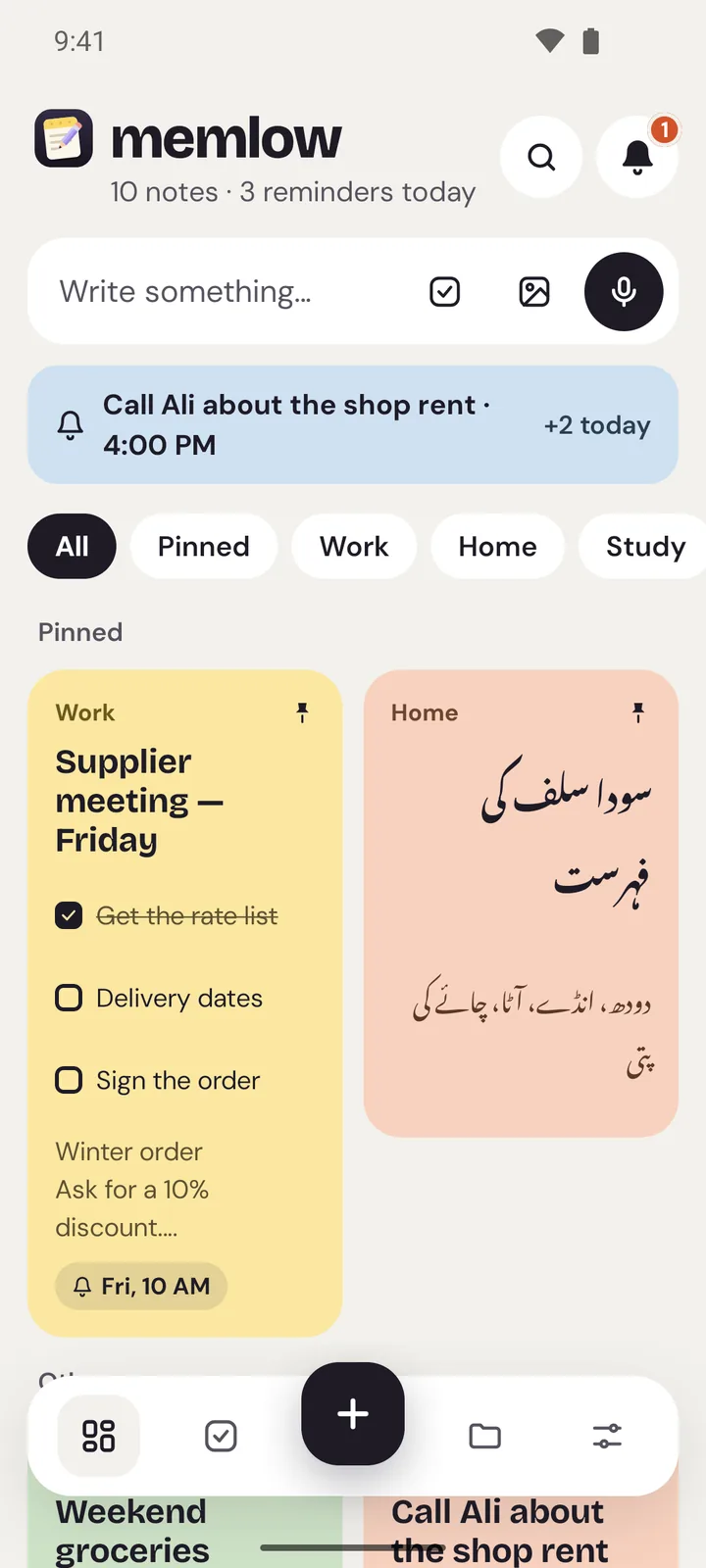
Memlow's Home screen on Android with the same colourful notes
  • One backup formatMemlow on the web and on Android read and write the same backups and .memlow files.
  • Phone to computerWhile connected to your Drive, the web app brings in the phone's newer notes. After reopening, tap Reconnect.
  • Computer to phoneOn the phone, restore from Google Drive and choose Merge. The newer copy of each note wins.
  • Encrypted all the wayOne backup password locks every backup. Google can't read your notes, and neither can we.
How it works

Three steps, then it's yours

  1. Back up on oneLink Google Drive with a backup password, on the phone or on the web (with a free Memlow account).
  2. Link the otherUse the same Google account and the same backup password.
  3. Bring notes acrossThe web brings in the phone's newer notes; on the phone, Restore brings in the web's.
How your notes travel

From one device to the other, locked all the way

  1. Your deviceYou write on the web or on Android. Notes are saved right there.
  2. Locked on the deviceYour backup password encrypts them (AES-256-GCM) before upload.
  3. Your Google DriveIn Memlow's hidden app folder. Google can't read the notes.
  4. Your other devicesSame Google account, same password: the notes come back.

How it works

Keeping notes on phone and computer usually means a company server in the middle, holding a copy of every note. Memlow never holds your notes. Instead, both versions back up to the same place: a hidden Memlow folder in your own Google Drive, encrypted with your backup password. Because the web app and the Android app use the same backup format, each can open what the other wrote.

It isn't live syncing, where every keystroke appears on the other screen. Think of two notebooks that swap pages through a locked box in your Drive. When a note is in both, the newer copy is kept.

Set it up once

  1. On your phone: in the Memlow app, open Settings → Google Drive backup, choose your Google account and create a backup password. Tap Back up now.
  2. On your computer: open app.memlow.com, sign in to your free Memlow account, go to Settings → Storage and Google Drive and link the same Google account.
  3. Memlow finds the phone's backups and asks for the backup password you chose in the app. Enter it and choose Open my backups. Your phone's notes appear in the browser.

Starting on the computer instead? Link Drive on the web first and create the password there, then use the same account and password on the phone.

From your phone to your computer

While app.memlow.com is connected to your Drive, it checks for newer notes when you come back to it and every 10 minutes, and brings in what the phone has backed up. The phone backs up daily, weekly or when you tap Back up now, so tap it before you sit down at the computer if you want today's notes there straight away.

On the web, Google's sign-in isn't kept. It lasts about an hour and ends when you reload or reopen the page. Memlow then shows Reconnect in the sidebar and in Settings: one tap links it again, brings in the phone's newer notes and backs up.

From your computer to your phone

While it's connected, the web app backs up whenever something has changed (at most every 15 minutes, and soon after you switch away). The phone doesn't fetch those notes on its own, so bring them in when you need them:

  1. In the app, open Settings → Restore from a backup → Google Drive.
  2. Pick the newest backup. Backups from the web say “Memlow web” and the browser that made them.
  3. Enter your backup password and choose Merge. Notes from the backup are added, and where a note is in both, the newer copy is kept.

No Google Drive? Use a backup file

You can do the same by hand, with no internet at all. On the web, Settings → Backup and data saves a .memlow backup file; on the phone, Settings → Create backup file does the same. Copy the file across with a USB cable or a memory stick and restore it on the other side. Files are password-protected by default. Our guide to using the same notes on your phone and computer covers both ways in more detail, including what happens when one note changes in both places.

Privacy, in plain words

Your notes stay yours.

No adjectives, just how it works. Memlow has no server that stores notes, so there is nothing of yours for us to read, sell or lose.

Read the privacy policy

Where notes live
On your device: the phone's storage, or your browser's own storage on the web.
Accounts
A Memlow account never holds your notes. It keeps only your name, email and how you sign in.
Backups
Optional, in your own Google Drive or a file, encrypted on your device with your password (AES-256-GCM) before they leave it.
Who can read them
Only you. Not Google, not us. That also means we can't recover a lost backup password.
Visits and AI
The website counts visits without cookies or IDs, and the notes app sends nothing. No AI reads your notes. The Android app shows a few ads, which never see your notes.
Questions

Good to know

Something else? See Support or write to support@memlow.com.

Does Memlow sync notes between my phone and computer?

Not live. Both apps back up to your own Google Drive. While app.memlow.com is connected to your Drive it brings in the phone's newer notes, and on the phone you restore the web's notes from Google Drive.

What do I need on both devices?

The same Google account, so both look in the same Drive, and the same backup password, so each can open what the other wrote.

How soon do my phone's notes appear on the computer?

Once the phone has backed up, app.memlow.com brings them in the next time it checks: every 10 minutes while it's connected, or straight after you tap Reconnect. Tap Back up now on the phone to send them right away.

Is there an iPhone app?

No, but on an iPhone or iPad you can open app.memlow.com in Safari and tap Share, then Add to Home Screen. It uses the same Google Drive backups.

What happens if I edit the same note on both?

Memlow keeps the newer copy of that note. On the web, the copy it replaced is kept in the note's Version history.

Your notes stay yours.

Memlow is free and private, with no AI. Start writing in your browser, or get the Android app.

Memlow's notes: colourful cards with checklists, reminders and folders